

Is Fellow Safe? Yes for Most Teams, if Your Guests Are Told
Fellow calls itself the secure AI meeting assistant, and on paper it earns the name. Is Fellow safe, then? For most work meetings, yes.
Fellow says it never trains AI on your meetings and holds a SOC 2 Type II report, an independent audit of its security controls. It stores data on Amazon Web Services (AWS) in Canada. My concerns sit with the people in the call, not the servers:
- Quiet recording: Fellow's botless desktop app records "without notifying external participants". Your teammates get a notice, but clients don't. Telling them falls to you, under your recording consent law.
- Files that stay: transcripts and summaries are kept until someone deletes them. Scheduled auto-deletion, including deletion right after processing, is an Enterprise feature.
- Several AI vendors: Fellow's sub-processor list names Anthropic, OpenAI, Google, Groq and Together.ai for AI notes, and AssemblyAI for transcription. All are listed in the USA.
The quiet-recording risk is real for notetakers in general. In August 2025, NPR reported a class action claiming Otter's notetaker recorded a man's confidential work call without his consent. He had no Otter account.
If I were choosing, I'd use Fellow for internal meetings as it comes. For client calls, I'd use the bot or turn on the disclosure email. For patient conversations, I'd sign Fellow's business associate agreement (BAA), the contract the US health privacy law HIPAA requires, before the first call.
Which meetings Fellow suits
- Fine as it comes: stand-ups, one-to-ones and reviews where everyone is in your Fellow workspace.
- Fine once you say it: sales calls, client meetings and interviews, with the bot or a spoken notice.
- Paperwork first: health information, which needs the BAA from Fellow's Enterprise row.
- Enterprise or nothing: firms that must delete recordings on a schedule or redact account numbers.
How I checked
On 14 November 2026, I read Fellow's privacy policy, sub-processor list, trust center, pricing and compliance pages, plus nine help center articles. I also unpacked the Chrome extension to read its permission list.
If a cloud copy of your meetings is the worry, look at Voibe Work, the app we build. It deletes the audio after processing and saves the notes on your computer. It has a 7-day free trial with no credit card.
- Every plan and what each costs: Fellow pricing
- Tools people move to, for small teams and finance: Fellow alternatives
Key Takeaway
Fellow is safe for most work meetings. It says it never trains on your data, holds SOC 2 Type II and hosts on AWS in Canada. Its botless mode doesn't tell guests, and auto-deletion is Enterprise-only.
Key Takeaways: Fellow Safety at a Glance
Every row comes from Fellow's own pages and public store listings, checked on 14 November 2026. Skim it here, then read on for the rows that need judgment.
| Question | Fellow's answer (November 2026) | Source |
|---|---|---|
| How does it record? | A Note Taker bot, Zoom Native Capture, a botless desktop app for Mac and Windows, and botless iPhone and Android apps | Help center |
| Who gets told? | The bot posts a chat message. Botless recording notifies internal participants only. | Botless recording page; help center |
| Where is it stored? | On AWS, with data in Canada (the Canada Central region) | Sub-processor list; security help article |
| How long? | Transcripts and summaries until deleted. Auto-deletion, down to zero days, on Enterprise. | Note Taker security article; auto-deletion article |
| Backups | Kept for 30 days | Security help article; privacy policy |
| Which AI? | AssemblyAI for transcription. Anthropic, OpenAI, Google, Groq and Together.ai for AI features. | Sub-processor list (updated 13 October 2026) |
| Trained on? | No, on every plan, and not by its AI providers either, per Fellow | Homepage; trust center |
| Encryption | AES-256 at rest and HTTPS in transit, per Fellow | Security help article |
| Compliance claims | SOC 2 Type II, GDPR and CCPA. Fellow also claims HIPAA, with BAAs on the Enterprise row. | Trust center; pricing page |
| Finance controls | Redaction, recording blocks, audit logs and Global Relay archiving, mostly on Enterprise | Compliance page; help center |
| Chrome extension | Runs on Google Meet, Google Calendar and Fellow's own sites only | Extension manifest, version 3.2.3 |
| Breaches, suits, bans | None found as of 14 November 2026 | News, court and university IT searches |
| Ratings | App Store 3.17 from 24 ratings. Chrome Web Store 4.8 from 63. | App Store; Chrome Web Store |
| Price | Free for 5 AI notes per user, for life. Team $7, Business $15 and Enterprise $25 a seat a month, billed annually. | Our Fellow pricing breakdown |
| Option with no vendor-side copy | Voibe Work, the app we build, deletes meeting audio after processing and saves notes on your computer, not on Voibe's servers | Where Voibe Work differs |
What Is Fellow, and How Does It Record a Meeting?
Fellow is a meeting-agenda and one-on-one app with an AI notetaker built in, made by Fellow Insights Inc. in Ottawa, Canada. The company's address appears on its website and on its Chrome Web Store listing.
It started as a place to plan meetings. The notetaker now sits at the center, alongside agendas, action items and pre-meeting briefs.
Four ways Fellow records
- Note Taker bot: joins Zoom, Google Meet or Teams as a participant. Someone has to admit it, and it posts a chat message saying it's recording.
- Zoom Native Capture: records through Zoom's own recording interface, so no bot joins. Fellow sends no notice, though Zoom shows its own if your account has recording notices on.
- Desktop app, no bot: the Mac and Windows app captures your mic and computer audio, in any meeting app or in person.
- Phone app, no bot: the iPhone and Android apps record in-person meetings through the phone's mic.
Every route ends in the same place, a meeting note in your Fellow workspace. Plans run from a Free tier with 5 lifetime AI notes per user to Enterprise at $25 a seat a month, billed annually, from 10 users.
Where Does a Fellow Meeting Go? US AI Vendors, Then AWS in Canada
Fellow stores your meetings on AWS, with the data held in Canada. Its sub-processor list, updated 13 October 2026, gives AWS's data location as Canada. A help article from 6 April 2026 names the Canada Central region.
The processing happens elsewhere. Every transcription and AI vendor on the list is located in the USA.
The path, step by step
- Capture: the bot, Zoom capture, desktop app or phone app records the meeting. Bot recordings run through Recall AI and Fly.io, both in the USA.
- Transcription: the audio goes to AssemblyAI. Fellow lists Deepgram for older customers.
- AI notes: large language models from Anthropic, OpenAI, Google, Groq or Together.ai write the summary and action items.
- Storage: the recording, transcript and notes stay in your workspace until someone deletes them, or until an Enterprise retention rule does.
Fellow's trust center says data sent to its AI vendors is deleted promptly after processing. Its Note Taker article adds that vendors remove it after a set length of time.
Key Takeaway
Fellow's capture, transcription and AI notes run through US vendors, then the meeting is stored on AWS in Canada until you delete it. Admins can switch off every AI vendor at once.
Where Your Meeting Goes With Each Fellow Recording Mode
The four recording modes share storage and training rules. They differ in who gets told. Each row gives Fellow's own answer, with Voibe Work underneath for comparison.
| Mode | Who's told in the call | Where notes are stored | Retention | Trains on your meetings? | Attestations (vendor-stated) |
|---|---|---|---|---|---|
| Fellow Note Taker bot | Everyone: a visible participant and a chat message | Fellow's workspace on AWS, Canada | Until deleted; auto-deletion on Enterprise | No | SOC 2 Type II, GDPR, CCPA; HIPAA and BAA on Enterprise |
| Zoom Native Capture | No notice from Fellow; Zoom's own notice if turned on | Same | Same | No | Same |
| Desktop app, no bot | Internal participants only | Same | Same | No | Same |
| Phone app, no bot | Not stated; Fellow's consent article puts notice on you | Same | Same | No | Same |
| Voibe Work | No bot; Voibe reminds you to tell people | On your computer, not on Voibe's servers | Audio deleted as soon as processing completes | Never | BAA available on request |
Fellow's consent article spells out the botless rule. With botless recording, "it is up to you as the user to notify other participants". The consent section below covers what to say.
Which AI Companies See a Fellow Meeting?
Fellow names its AI vendors on a public sub-processor list, which puts it ahead of many notetakers. Admins can switch all of them off under Workspace Settings, then Security, then Artificial Intelligence.
With that switch off, Fellow's privacy policy says every feature that relies on those vendors is disabled too. The vendors can't be switched on or off one by one.
| Vendor | What it does for Fellow | Location |
|---|---|---|
| AssemblyAI | Transcribes call recordings | USA |
| Deepgram | Transcription for older customers | USA |
| Recall AI and Fly.io | Run the meeting bots | USA |
| Anthropic, OpenAI, Google | Generative text and large language models | USA |
| Groq and Together.ai | Large language models for AI features | USA |
| Exa.ai | AI web search, from 19 November 2026 | USA |
What Fellow promises about those vendors
- No training: the list says "Customer data is not used to train AI models."
- Prompt deletion: the trust center says vendor copies are deleted promptly after processing.
- Advance notice: Fellow announced Exa.ai on its trust center on 19 October 2026, a month before the start date. It says Exa.ai runs with zero data retention.
If your contracts rule out OpenAI, Google or Anthropic as processors, you'd have to switch Fellow's AI off. That removes the AI notes most teams buy Fellow for.
Does Fellow Train AI on Your Meetings? It Says No, on Every Plan
Fellow says it never uses your meetings to train AI, and it says so on several pages. The homepage FAQ adds that this "applies to all plans, including free."
- The homepage says your data "is not used to train the models of Fellow's AI providers" either.
- The sub-processor list and the trust center repeat the promise.
- The Chrome Web Store listing says your data is never used to train AI models.
That puts Fellow ahead of tools that train by default, such as Otter on de-identified recordings. Our Is Otter safe? review covers that policy.
Voice samples are a separate question
Fellow can store voice samples from workspace users to label speakers in hybrid and in-person meetings. Its privacy policy treats them as biometric data.
Samples come only from users who turn on voice detection, never from outside attendees. Users can opt out in their settings, and admins can disable it for the whole workspace.
How Long Does Fellow Keep Your Meetings? Until Someone Deletes Them
On most plans, Fellow keeps your meetings for as long as the meeting note exists. Its Note Taker security article says transcripts and summaries "are stored indefinitely" until deleted. It sets no retention limit on video recordings either.
Members can delete a meeting's recording, transcript or notes from the note's menu. Deleted data may stay in backups for up to 30 days.
Auto-deletion on Enterprise
- Separate clocks: admins set one period for recordings, one for transcripts and one for AI notes.
- Zero-day retention: set recordings or transcripts to 0 days and Fellow deletes them as soon as it finishes processing.
- No exceptions per user: rules can give specific meetings, such as board meetings, a different period.
- A record of changes: the Enterprise audit log names the admin behind each retention change.
Fellow's help center says deleted content is also removed from backups. Members get no warning before deletion, so tell your team before you switch it on.
Leaving Fellow
Fellow's privacy policy says it deletes a whole account within 15 days of an organization's request. Backups may hold it for up to 30 more days.
One point for guests: if someone else's Fellow recorded you, you can't delete it yourself. Only members of that workspace with edit access to the note can.
Warning
Below Enterprise, Fellow sets no retention limit. Recordings, transcripts and summaries stay until a member deletes them.
Is Fellow SOC 2 or HIPAA Compliant? What It Claims
Fellow says it holds a SOC 2 Type II report and complies with GDPR, CCPA and HIPAA. Its trust center lists a SOC 2 Type II report for 2025, an external penetration test from 2025 and a standard security questionnaire.
- SOC 2 Type II: Fellow says it has had SOC 2 audits since 2020. Its latest report covers the Security and Confidentiality criteria and is shared under a non-disclosure agreement (NDA).
- Encryption: AES-256 for stored data and HTTPS between services, per its security article. Its vendors use TLS 1.2 or later in transit.
- GDPR: Fellow offers data processing agreements, names a Data Protection Officer and lists standard contractual clauses for transfers out of Europe.
- Sign-in: Google or Microsoft sign-in, plus Okta or OneLogin single sign-on (SSO), which the pricing page puts on Enterprise.
HIPAA and the BAA
Fellow's homepage and compliance page call it HIPAA compliant. Its pricing page shows the HIPAA and BAA row in the Enterprise column.
A BAA is a contract, not a certification. No outside body certifies HIPAA compliance, so read Fellow's claim as its own. If you handle patient information, get the BAA signed and check what it covers before recording.
I found no ISO 27001 certificate (the international security standard) in Fellow's trust center. Its listed frameworks are SOC 2, HIPAA, GDPR and CCPA.
Key Takeaway
Fellow claims SOC 2 Type II, GDPR, CCPA and HIPAA, with AES-256 encryption. The BAA sits on the Enterprise row, and a BAA is a contract, not a certification.
Botless Recording and Consent: Who Gets Told You're Recording?
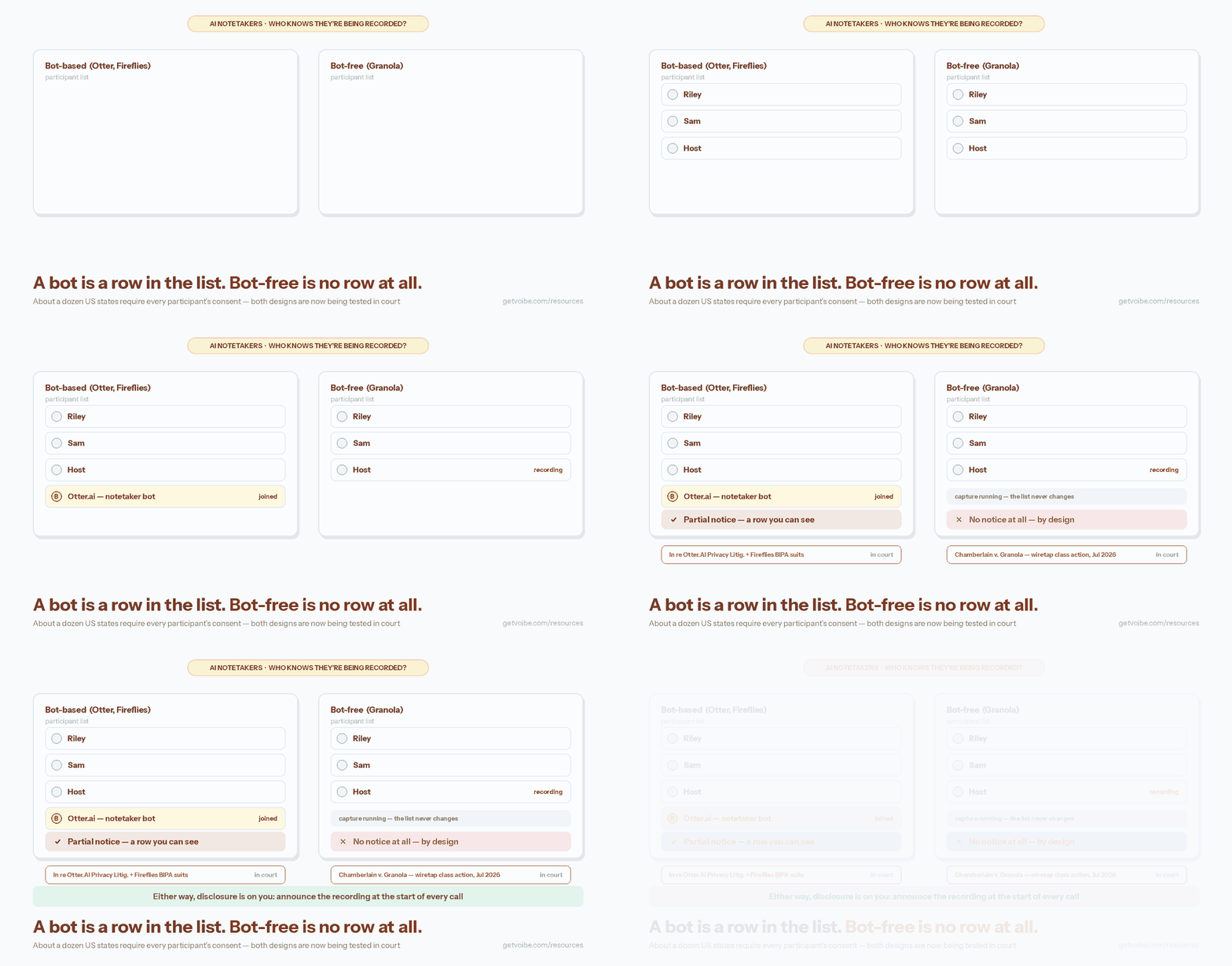
Fellow tells your guests only when its bot joins the call. The bot appears in the participant list and posts a chat message naming who invited it.
The other modes are quieter. Fellow's botless page says the desktop app records "without notifying external participants". Guests see "no visual indicators that change the tone of the meeting". Zoom Native Capture sends no Fellow notice either.
Fellow's consent tools
- Internal notice: people in your Fellow workspace are notified when a botless recording runs.
- Disclosure email: an email to guests one hour before an auto-recorded meeting. It's off by default, and admins switch it on under Workspace Settings, Recording, Consent and disclosure.
- Enterprise rules: admins can block recording, require consent or send disclosures for matching meetings. Fellow says every disclosure lands in an audit log.
- An off switch: admins can disable botless desktop recording for the whole workspace.
Fellow's FAQ is clear about whose job this is. Organizations are responsible "for informing external participants where required."
What the law asks
- Federal rule: one party's consent is enough under US federal law, as Fellow's own FAQ notes.
- All-party states: some states, including California, Illinois and Florida, need everyone's consent.
- Abroad: rules differ by country, and a guest's location can count as much as yours.
Our AI notetaker consent laws guide covers state rules, late joiners and calls across borders.
With Voibe Work
No bot joins a Voibe Work call either. Each time a recording starts, Voibe Work reminds you to tell everyone you're taking notes. Following the recording-consent rules where you and your participants are is still your responsibility.
For balance, Fellow's bot, disclosure email and Enterprise rules give admins more consent tooling than Voibe Work's reminder.
Fellow's Finance Controls: Redaction, Recording Blocks and Archiving
For banks, private equity firms and advisers, Fellow Enterprise has more governance than most notetakers. Its compliance page and help center describe these controls:
- Transcript redaction: removes names, account numbers, NPI (nonpublic personal information) or flagged terms. Fellow says the matching audio and video are cut from the recording too. Enterprise only.
- Recording blocks: stop Fellow recording meetings with external attendees, certain counterparty domains or title keywords such as DNR or Confidential.
- Auto-record rules: admins decide which meetings are always, never or optionally captured. Enterprise only.
- Information barriers: team-scoped channels keep one business unit's notes from another.
- Logged pauses: each pause and resume is logged with a timestamp.
- Archiving: a Global Relay integration archives transcripts, summaries and action items, which Fellow ties to FINRA, SEC 17a-4 and MiFID II rules.
No notetaker makes a firm compliant on its own. Your compliance team decides whether these controls meet your recordkeeping rules.
What the safer setup costs
Most of these controls need Enterprise, at $25 a seat a month billed annually, from 10 users. The smallest contract is $3,000 a year. Our Fellow pricing guide lists what each lower plan leaves out.
Some teams need neither retention controls nor more than 10 AI notes a month. For them, Fellow Team at $84 a year costs $65 (77.4%) less than Voibe Work at $149. Against Fellow Business at $180, Voibe Work is $31 (17.2%) less.
Our ranking of AI meeting note takers for finance compares these controls desk by desk.
What Connecting Claude or ChatGPT to Fellow's MCP Server Exposes
Fellow's MCP server lets AI assistants such as Claude, ChatGPT, Cursor and Microsoft Copilot read your Fellow meetings. MCP (Model Context Protocol) is the standard these assistants use to connect to other apps.
Its help article, dated 7 October 2026, lists what an assistant can reach: AI notes, action items, transcripts and calendar events. Each user only reaches meetings they can already open in Fellow.
The admin controls
- Off until an admin says so: an admin enables it under Workspace Settings, Fellow MCP.
- Tool by tool: each tool has its own switch, so admins can allow reading while keeping agenda editing off.
- New tools: new tools are allowed by default unless an admin turns that default off.
- Visibility: admins see every connection and its last-used time, and tool changes go into the audit log.
Fellow says your data "stays safe inside Fellow" when you connect. Once Claude or ChatGPT reads a transcript, though, that copy is handled under the AI company's own terms. Treat each connection as sharing those meetings with that company.
Voibe Work's Meeting MCP, for comparison
Voibe Work has its own Meeting MCP. Click MCP on the Meetings page to connect Claude, Cursor, ChatGPT, Claude Code or another app. One switch turns it off for every AI app at once.
Voibe's panel says: "Apps you connect can read your meeting titles, summaries and transcripts." What an app reads goes to the company behind its AI, for example Anthropic for Claude. None of it goes through Voibe's servers.
The Meeting MCP launch post covers setup, and our list of AI note takers with MCP compares the rest.
What You Grant the Fellow Chrome Extension
Fellow's Chrome extension asks for narrow access: Google Meet, Google Calendar and Fellow's own sites. I unpacked version 3.2.3, updated 9 November 2026, and read its manifest, the extension's permission file.
| Permission | What it covers | Likely use |
|---|---|---|
| Scripts on Meet and Calendar | meet.google.com and calendar.google.com only | Showing notes beside calendar events and calls |
| Host access | Fellow's own domains, fellow.app and fellow.co | Signing in and syncing with your workspace |
| Cookies and storage | Saved settings and Fellow sign-in | Keeping you logged in |
| Native messaging (optional) | Talking to the Fellow desktop app on your computer | Starting a botless recording when you join a call |
That is a much smaller footprint than recorders that ask to read every website you visit. The extension can't capture your screen or tabs by itself.
What the Chrome Web Store listing says
- Fellow declares that it handles personally identifiable information and authentication information.
- It declares that it doesn't sell that data or use it for unrelated purposes.
- Google marks the listing as following recommended practices, from a publisher with no history of violations.
One setting deserves a look. The extension can start a botless recording automatically when you join a meeting from Google Calendar. Leave it off if you'd rather decide call by call.
The desktop app needs microphone and screen recording permission on your computer. Fellow says screen recording access is used to capture the other participants' audio.
Has Fellow Been Breached, Sued or Banned?
I found no data breach, lawsuit or institutional ban involving Fellow as of 14 November 2026. I searched news coverage, court records and university IT notices.
- Breaches: no reported incident. Fellow's privacy policy says it will contact affected users and regulators if one happens.
- Lawsuits: none found. Recent notetaker suits named other vendors, which our Otter and Granola safety reviews cover.
- Bans: none naming Fellow. Universities that restrict notetaker bots name others, such as Otter, Read AI and Fireflies at Virginia Tech and Case Western Reserve.
Two things worth knowing
Zoom set 14 October 2026 as the start of a new rule, per Fellow's help center. Every notetaker bot, Fellow's included, must now join on behalf of a Zoom user who authorized its app.
Fellow's iPhone app rates 3.17 out of 5 from 24 App Store ratings, checked today. A July 2026 review complained that recordings disappeared. That points to reliability, not a security failure, but it counts if a lost recording would hurt you.
Key Takeaway
No breach, lawsuit or institutional ban involving Fellow turned up as of 14 November 2026. University blocks on notetaker bots name other vendors.
Is Fellow Safe for Your Meeting? The Fellow Safety Decision Tree
Five questions, from the easiest case to the hardest. Stop at the first one where you can't accept Fellow's answer.
- Is everyone in the call in your Fellow workspace? If yes, Fellow notifies them, and you're done. If not, keep going.
- Will guests join while you record without the bot? The desktop app, phone app and Zoom capture don't tell them. Say it out loud, turn on the disclosure email or send the bot.
- Will health information come up? Sign Fellow's BAA first. It's on the Enterprise row of the pricing page.
- Must recordings be deleted on a schedule? Below Enterprise, files stay until someone deletes them, so you need Enterprise auto-deletion.
- Are OpenAI, Anthropic or Google off-limits? All three appear on Fellow's AI vendor list. Turn Fellow's AI switch off, or pick another tool.
Most internal meetings stop at question 1. Client calls usually reach question 2, and legal, medical or deal calls often reach question 4.
Our notetaker guide for lawyers and healthcare notetaker guide walk through those professions' rules.
The 5-Step Fellow Safety Audit: Settings to Check Today
Fellow puts most safety choices in an admin's hands. These five settings close the biggest gaps, in the order I'd check them.
- Decide on botless recording. Under Workspace Settings, Recording, Recording methods, admins can turn off desktop recording. Keep it only if your team will tell guests every time.
- Turn on the disclosure email. Under Recording, Consent and disclosure, send guests an email an hour before auto-recorded meetings. Lock the setting so members can't switch it off.
- Set retention and downloads. Under Content and retention, Enterprise admins set auto-deletion. Recording downloads stay off unless an admin allows them, so check nobody switched them on.
- Review the AI switch. Under Security, Artificial Intelligence, one switch covers every AI vendor. Leave it on only if your contracts allow those vendors.
- Lock down the MCP server. Under Fellow MCP, see who has connected an AI app. Under Security, Available tools, turn off agenda editing and new tools by default.
Two more for individual users
- Voice detection: turn it off in your user settings if you'd rather Fellow kept no voice samples.
- Auto-start in Chrome: switch off automatic botless recording from Calendar join links unless you want every call captured.
Warning
Turning on auto-deletion deletes matching content within an hour, with no warning to members. Download anything you need first.
Where Voibe Work Differs: No Copy on Voibe's Servers
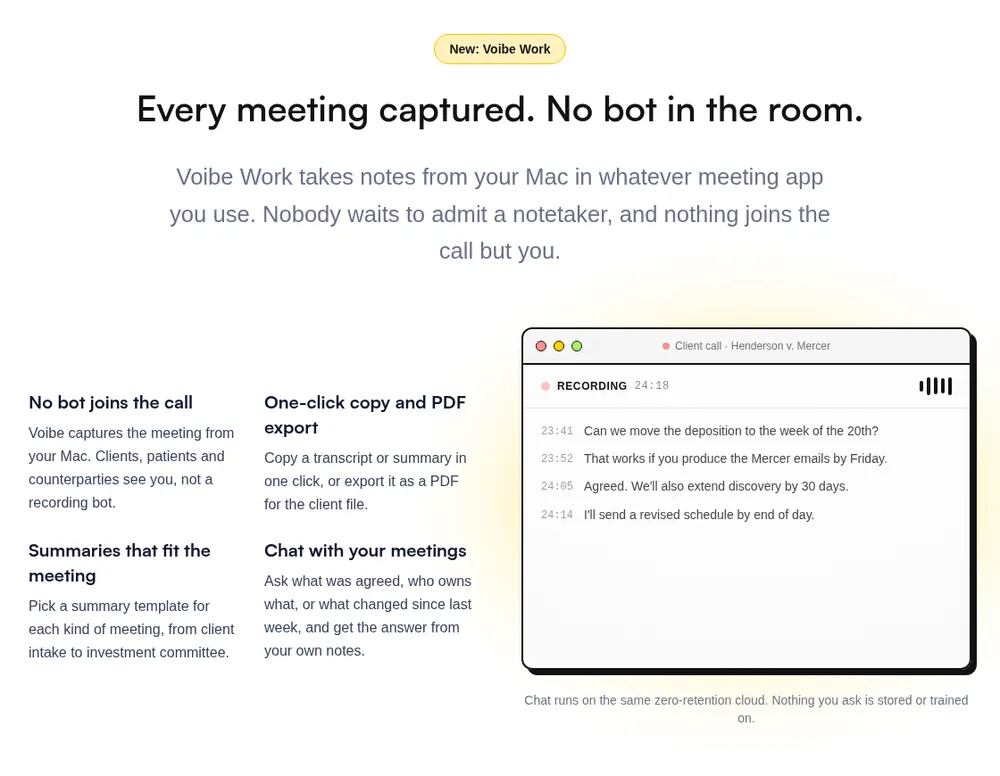
Voibe Work deletes meeting audio as soon as processing completes, and saves the notes on your computer. Fellow keeps meetings in its cloud until someone deletes them, unless you pay for Enterprise retention rules.
How Voibe Work handles a meeting
- Voibe Work captures calls from your Mac or Windows PC in Zoom, Teams, Google Meet, Webex, Slack huddles or any other app. No bot joins.
- In-person meetings record through your Mac or PC's mic.
- Open-source models on zero-retention cloud providers process the audio. No OpenAI, Google, Anthropic or Microsoft model is in the audio path.
- The transcript and summary are saved on your computer, not on Voibe's servers, and never used to train AI.
Processing runs in the cloud, so meeting notes need an internet connection. Speaker labels, summary templates for each meeting type, chat with your meetings and PDF export are included.
Compliance, plainly
For Voibe, a BAA is available on request. Voibe doesn't claim HIPAA compliance or SOC 2, so Fellow is ahead on audit paperwork.
Where Fellow still wins
- A SOC 2 Type II report and a public sub-processor list
- Admin retention rules, redaction, recording blocks and Global Relay archiving
- Agendas, one-on-ones, shared team notes, CRM sync and phone apps
Voibe Work costs $149 a year with dictation included. That's $31 (17.2%) less than Fellow Business and $151 (50.3%) less than an Enterprise seat. It has no admin console, no calendar auto-join and no phone app.
Key Takeaway
Voibe Work deletes meeting audio after processing and saves notes on your computer, with a BAA available on request. Fellow leads on SOC 2, admin controls, redaction and archiving.
Trusted by 4,000+ professionals, including people at Netflix, NVIDIA, Amazon, Twilio, and Intercom




See Voibe Work in action
Meeting notes with no copy on Voibe's servers
Start free on Mac or Windows. 7 days of every Voibe Work feature, no credit card required.
Who Fellow Is Safe For, and Who Should Pick Something Else
Fellow is safe for most internal and client meetings, as long as guests know they're recorded. It fits less well when a cloud copy or a US AI vendor would hurt you.
| Your situation | Fellow verdict | What to do |
|---|---|---|
| Internal stand-ups and one-to-ones | Safe | Use any mode; teammates are notified |
| Sales calls and customer interviews | Safe with consent | Use the bot, or say it out loud before a botless recording |
| Anyone in an all-party consent state | Safe only with everyone's consent | Turn on the disclosure email and ask each person |
| Banks, PE firms and broker-dealers | Strong fit on Enterprise | Set redaction, recording blocks and Global Relay archiving |
| Small advisory firms under 10 seats | Partial fit | Lower plans lack auto-deletion and redaction; see Fellow alternatives |
| Patient conversations | Possible with paperwork | Sign the BAA from the Enterprise row first |
| Privileged legal meetings | Risky below Enterprise | Read the lawyers guide; prefer no vendor-side copy, such as Voibe Work |
| Contracts that bar OpenAI, Google or Anthropic | Not a fit for AI notes | Turn Fellow's AI off, or pick another tool |
If your row says look elsewhere
- Our Fellow alternatives rank eight tools for small teams and finance.
- The best no-bot meeting note takers cover desktop capture.
- Our guide to confidential meeting notes goes deeper on sensitive calls.
Is Fellow Safe? FAQ
Quick answers on where Fellow keeps your meetings, what it claims, and how consent works, grouped by theme.
Privacy and your data
Is Fellow safe to use?
For most work meetings, yes. Fellow says it never trains AI on your meetings, holds a SOC 2 Type II report and stores data on AWS in Canada. The risks are botless recording that doesn't notify guests, files kept until deleted below Enterprise, and several US AI vendors.
Where does Fellow store my data?
On Amazon Web Services, with data in Canada. Fellow's sub-processor list gives AWS's data location as Canada, and a help article names the Canada Central region. Its transcription and AI vendors are located in the USA.
Does Fellow train AI on my meetings?
No, according to Fellow. Its homepage says meeting data isn't used to train AI models on any plan, including Free, and isn't used by its AI providers either. Its sub-processor list and trust center say the same.
How long does Fellow keep recordings?
Until someone deletes them, on most plans. Fellow's help center says transcripts and summaries are stored indefinitely. Enterprise admins can set auto-deletion, down to zero days after processing. Backups are kept for 30 days.
Compliance, vendors and company
Is Fellow HIPAA compliant?
Fellow says it is, and its pricing page lists HIPAA and BAA on the Enterprise row. A BAA is a contract, not a certification, and no outside body certifies HIPAA compliance. Get the BAA signed and read its scope before recording health information.
Is Fellow SOC 2 compliant?
Fellow says yes. Its trust center lists a SOC 2 Type II report for 2025, and a help article says audits have run since 2020. The report covers Security and Confidentiality and is shared under NDA.
Which AI companies process Fellow meetings?
Fellow's sub-processor list names AssemblyAI for transcription, Deepgram for older customers, and Anthropic, OpenAI, Google, Groq and Together.ai for AI features. Exa.ai joins on 19 November 2026 for AI search. Admins can switch all of them off together.
Who owns Fellow?
Fellow Insights Inc., based in Ottawa, Canada. The address appears on Fellow's website and on its Chrome Web Store listing.
Consent, the bot and alternatives
Does Fellow notify meeting participants?
Only when its bot joins. The bot appears in the participant list and posts a chat message. Botless desktop recording notifies internal participants only, and Zoom Native Capture sends no Fellow notice. Admins can turn on a disclosure email for auto-recorded meetings.
Is Fellow's botless recording legal?
It depends on where you and your guests are. Some US states, including California, Illinois and Florida, need everyone's consent. Fellow says organizations must inform external participants where required, so tell people before you record.
Is the Fellow Chrome extension safe?
Its permissions are narrow. Version 3.2.3 runs on Google Meet, Google Calendar and Fellow's own sites only, with cookies and storage access. Google's listing says it follows recommended practices, from a publisher with no violations.
What's a safer alternative to Fellow?
It depends on the risk. Voibe Work deletes meeting audio after processing and saves notes on your computer, with a BAA available on request. Fellow is ahead on SOC 2, admin controls, redaction and archiving.
Is Fellow Safe in 2026? My Verdict
Fellow is safe for most work meetings, and its security paperwork is among the strongest I've seen from a notetaker. A no-training rule on every plan, a SOC 2 Type II report and a public vendor list are real strengths.
The weak spots are about people and time, not servers.
What I'd want Fellow to fix
- A botless mode marketed on not telling external guests
- Auto-deletion and redaction locked to a 10-seat Enterprise plan
- A HIPAA compliance claim, where a BAA is the real safeguard
My recommendation
Use Fellow for internal meetings as it comes, and for client calls with the bot or the disclosure email on. Finance firms that need redaction and archiving should price Enterprise.
If you'd rather no copy of the meeting sat on a vendor's servers, try Voibe Work. The 7-day trial covers every feature, with no card and no automatic charge.
Info
I tested Fellow myself and checked every source on 14 November 2026. Fellow adds AI vendors from time to time, so re-check its sub-processor list before you sign.