

The Quick Answer: Keep the Audio on Your Machine, Then Teach It the Matter
A case note is the most candid thing a lawyer writes. It holds the theory you haven't pleaded, the weakness you haven't disclosed and the client's name in every line.
Dictate it into the wrong app and a copy of that audio can sit on a server you never vetted. You can avoid that in about 20 minutes of setup.
To dictate confidential case notes, use an app that transcribes on your own computer, teach it the matter's names and terms, and speak straight into the matter file.
I build Voibe, so Voibe is the app in the steps, but the checks work on any tool:
- Pick the mode first. On an Apple Silicon Mac (M1 or later), choose on-device mode, so the audio never leaves the Mac and it works with no internet. On Windows or an Intel Mac, Voibe uses its zero-retention cloud.
- Load Voibe's Dictionary, its custom vocabulary, with party names, case names, statute shorthand and Latin, so they come out right the first time.
- Set Memory shortcuts, Voibe's spoken text expansion, for the privilege header, the file-memo heading and your signature block.
- Dictate into the matter file: Word, a practice-management system such as Clio, or any app with a text field.
- Review, mark and file the note before anyone else sees it.
Key takeaways
| Question | Answer |
|---|---|
| What do the confidentiality rules ask? | The American Bar Association (ABA) Model Rule 1.6(c) asks for reasonable efforts to prevent disclosure. Where the audio goes is the first thing to check. |
| Most private setup | On-device dictation on an Apple Silicon Mac: no upload, works offline |
| Windows or an Intel Mac | Voibe's zero-retention cloud: audio deleted the moment transcription completes, never stored or used for training |
| Legal vocabulary | Voibe's Dictionary changes the transcription itself, so names and terms of art land spelled right |
| Free option | Voibe Free: 2,000 cloud words a week, and on an Apple Silicon Mac it dictates on the device by default |
| Paid option | Voibe Dictation: $9.90 a month, $99 a year or $199 once, Mac and Windows |
Estimated time to complete: about 20 minutes, most of it typing names into the Dictionary.
Rules, prices and vendor settings were checked on 12 November 2026. None of it is legal advice, so check your own state bar's guidance too.
Key Takeaway
Ask where the audio goes before you ask how accurate the app is. On-device dictation on an Apple Silicon Mac answers the confidentiality question with no server at all. A legal Dictionary and Memory shortcuts then make the notes worth keeping.
What the Confidentiality Rules Ask of Your Dictation App
No ethics rule names a dictation app. The rules ask you to judge the risk and act on it, and a voice tool falls under the same duty as email or cloud storage.
ABA Model Rule 1.6(c): reasonable efforts
Model Rule 1.6(c) says a lawyer "shall make reasonable efforts to prevent the inadvertent or unauthorized disclosure of, or unauthorized access to, information relating to the representation of a client."
Comment [18], the ABA's official commentary on that paragraph, turns it into a weighing test. It lists the sensitivity of the information and the likelihood of disclosure without more safeguards. It also lists the cost and difficulty of those safeguards, and how much they get in the way of the work.
A case note scores high on sensitivity. A safeguard that costs nothing and changes nothing about how you work, like on-device mode, is hard to argue against.
ABA Formal Opinion 477R: technology is a process, not a product
Formal Opinion 477R (May 2017) covers how lawyers secure client communications. It rejects a fixed list of security tools.
Instead it asks for a process: assess the risk, put safeguards in place, check they work and update them. It adds that highly sensitive matters may call for special precautions, including avoiding some technology altogether.
ABA Formal Opinion 512: AI tools that learn from your input
Formal Opinion 512 (29 July 2024) is the ABA's opinion on generative AI. As Frankfurt Kurnit summarizes it, a client's informed consent is needed before their confidential information goes into a self-learning tool.
Boilerplate in an engagement letter doesn't count as that consent. The opinion also tells lawyers to look into a tool's security measures and policies before using it.
A dictation app that trains its models on your audio raises the same question. An app that keeps no audio and never trains on it sits outside the self-learning risk the opinion describes. Your state bar still has the final word.
State rules and other jurisdictions
ABA opinions guide; they don't bind. Your state's version of Rule 1.6 and its ethics opinions control, and some states word the duty differently.
In England and Wales, paragraph 6.3 of the Code of Conduct for Solicitors from the Solicitors Regulation Authority (SRA) requires solicitors to keep client affairs confidential. The exceptions are disclosure the law requires or allows, and client consent.
Chat tools carry a separate risk from dictation. Our guide to AI and attorney-client privilege covers the February 2026 Heppner ruling on that question.
Info
ABA opinions are persuasive, not binding. Before you change how the firm dictates, read your own state bar's version of Rule 1.6 and any ethics opinion it has issued on technology or AI.
Where Your Words Go: On-Device, Zero-Retention Cloud or a Vendor's Cloud
Every dictation app does one of three things with your voice. Knowing which one tells you what you need to check.
On-device: nothing to vet but your own computer
The speech model runs on your computer and the audio never travels. Voibe does this on Apple Silicon Macs with open-source Whisper on the Neural Engine. The Mac apps MacWhisper and Superwhisper (in its local models) work the same way, as does desktop Dragon Legal.
Encryption in transit doesn't come into it, because nothing is in transit. The safeguard that counts is the device itself: a passcode, disk encryption and a screen you lock.
Zero-retention cloud: processed, then deleted
Voibe on Windows and Intel Macs sends audio, encrypted in transit, to its zero-retention cloud. Whisper Large Turbo, an open-source model on Groq or Cloudflare, transcribes it.
The audio is deleted the moment transcription completes, and it's never stored, sold or used to train any model. A second step formats the text with GPT-OSS 120B, an open-weight model, on Cerebras, and that step never sees the audio.
No third-party AI lab such as OpenAI, Google, Anthropic or Microsoft is in the audio path. You also never paste an API key or open an account with an AI vendor.
Typical vendor cloud: read the policy
Many popular apps keep audio or transcripts on their own servers. That isn't automatically wrong, but the retention period, the training setting and staff access become your questions to answer.
Our cloud vs local dictation explainer and zero data retention guide go deeper on each model.
Step 1: Pick the Processing Mode Before You Dictate a Client Name
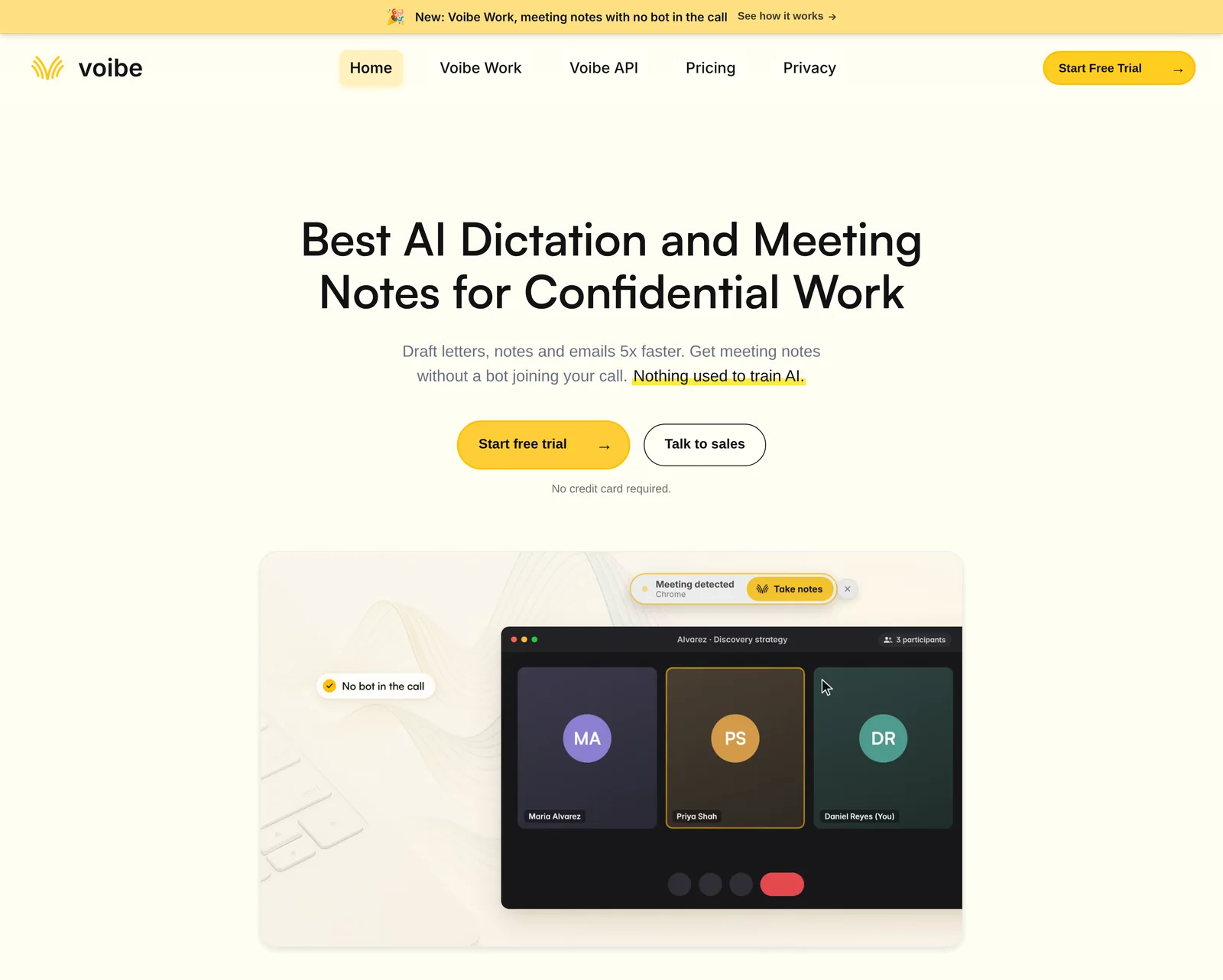
Choose the mode at setup, before the first client name passes through the microphone. You can switch later in Settings.
On an Apple Silicon Mac (M1 or later)
- Download Voibe from getvoibe.com. You don't need an account to try it, and Voibe supports macOS 14.4 or later.
- When setup asks for a processing mode, pick on-device. Whisper then runs on the Mac's Neural Engine.
- Open System Settings, then Privacy & Security, then Microphone, and turn Voibe on.
- Test it with Wi-Fi switched off. If words still appear, the audio isn't going anywhere.
On Windows or an Intel Mac
- Install Voibe for Windows, a native Windows app, or Voibe on your Intel Mac.
- Both run on the zero-retention cloud only. There's no on-device mode, so confidential notes go through that cloud and need an internet connection.
- Allow microphone access: on Windows, open Settings, then Privacy & security, then Microphone.
If your firm's policy says client audio must never leave the building, dictate case notes on an Apple Silicon Mac. A Windows PC can't meet that rule with Voibe.
Running Windows anyway? The Windows launch post explains the zero-retention design in full.
Step 2: Load the Matter's Vocabulary Into the Dictionary
Generic dictation gets legal names wrong, and a misspelled party name in a case note is a small disaster. Voibe's Dictionary fixes that at the source.
It feeds your terms into the transcription itself. That's different from find-and-replace afterwards, which only catches the mistakes you predicted.
What to put in it
| Type of term | Examples to add |
|---|---|
| Parties and people | Client surnames, opposing counsel, judges, witnesses |
| Case names | Your matter captions and the cases you cite most |
| Statute and rule shorthand | 12(b)(6), § 1983, FRCP for the Federal Rules of Civil Procedure, local rule numbers |
| Latin and terms of art | res judicata, voir dire, inter alia, estoppel |
| Practice-area jargon | GRAT for a grantor retained annuity trust, 1031 exchange, drug names in a medical malpractice file |
How to fill it fast
- Open the Dictionary in Voibe's settings and use bulk edit to paste a list, one term per line.
- Coming from Dragon? Export your Vocabulary Center list as TXT or XML and paste it straight in.
- Add each new matter's names on the day you open the file, before the first note.
The Dictionary is part of every plan, including Voibe Free. Our guide to switching from Dragon to Voibe walks through the Dragon export in detail.
Step 3: Turn Boilerplate Into Memory Shortcuts
Memory turns a short spoken trigger into preset text. Dragon users know the same idea as Auto-Texts.
Case notes repeat the same headers all day, and those headers are where privilege marking slips. A shortcut makes the marking automatic.
Shortcuts worth setting up
- Privilege header: the exact marking your firm uses, such as privileged and confidential, attorney work product.
- File memo heading: matter, date, author and subject lines in your house format.
- Signature block: name, title, firm and bar number for letters you draft by voice.
- Standard paragraphs: a litigation-hold reminder or a conflicts-check line you repeat.
Keep triggers to two or three words you'd never say by accident, like privilege header. New Memory entries need a paid plan.
Step 4: Dictate Straight Into the Matter File
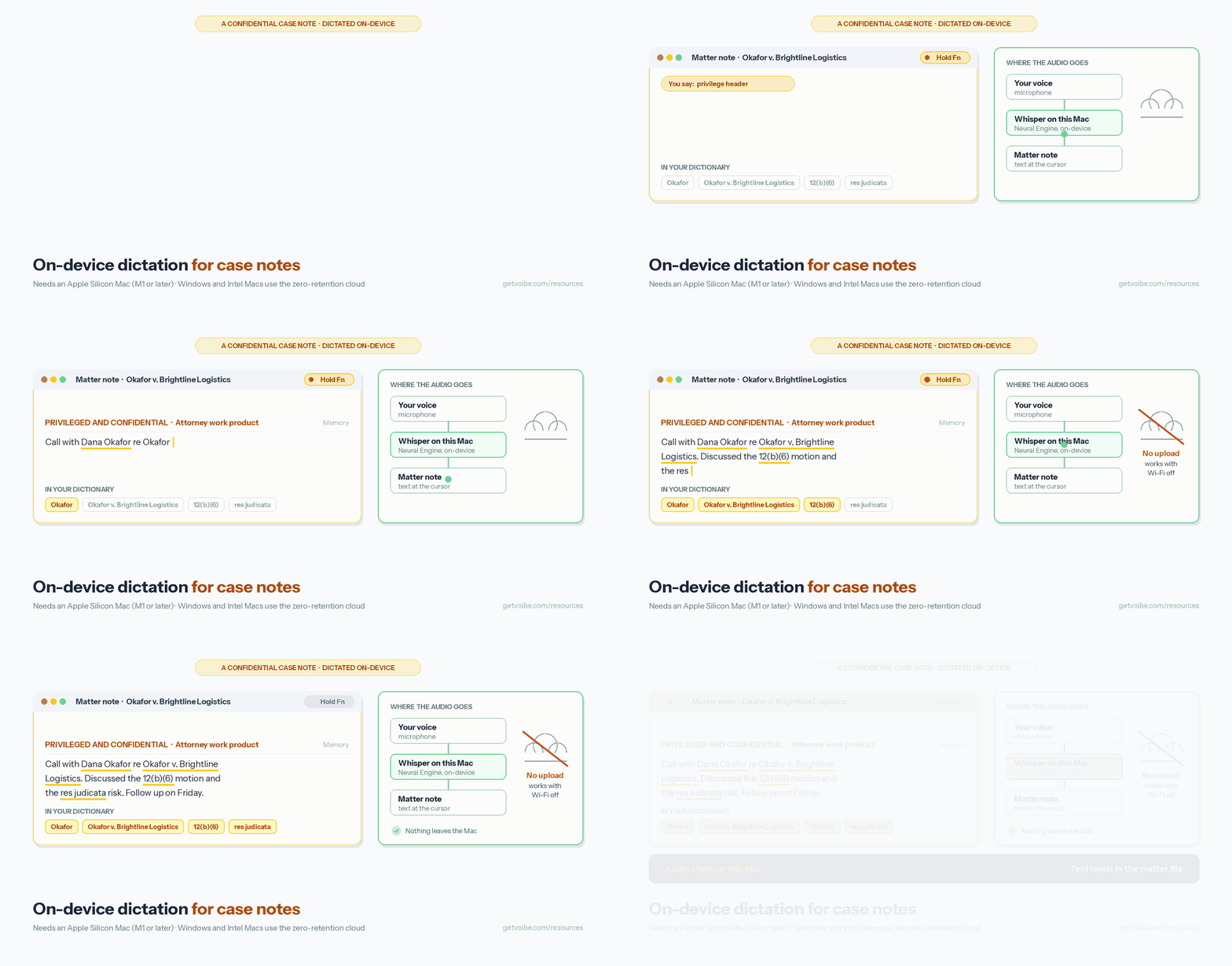
Put the cursor where the note belongs and talk. Voibe types into any app with a text field, so the note lands in the matter file instead of a separate dictation window.
That covers a matter note in Clio or another practice-management system, a Word memo or an email to co-counsel.
Choose how you start and stop
- Push-to-talk: hold the hotkey (Fn by default), speak and let go. It suits short notes between calls.
- Hands-Free Mode: double-tap to start, double-tap to stop. It suits a long attendance note.
- Live Dictation (Mac only): words stream onto the screen as you speak, so you can fix them before they land.
Punctuation and formatting by voice
Voibe punctuates on its own as you speak naturally. You can also say marks by name, such as comma, open paren, new paragraph or bullet point.
Smart Formatting then tidies punctuation, capitals, paragraphs and filler words like um. It doesn't paraphrase or rewrite what you said, which matters in a note that may be read as a record later.
Keep the microphone you own
Voibe works with a Philips SpeechMike, so you don't have to retire the hardware on your desk. A headset microphone also works well in a shared office.
Step 5: Review, Mark and File the Note
Dictation produces a draft. You still sign off on it before it becomes part of the file.
- Read it back once. Check names, numbers, dates and every negative. A dropped not reverses a note.
- Mark it. Say your privilege-header shortcut at the top if the note is work product.
- File it in the matter. The text that lands in the practice-management system or document store is the real record, so save it there and nowhere else.
- Don't paste it onward. Copying a case note into a cloud chatbot to summarize it undoes Steps 1 to 4.
Your matter file is also where retention rules, backups and access controls already apply. Dictating into it means the note inherits those controls on day one.
Seven Questions to Ask Any Dictation App Before It Hears a Client Name
Comment [18] to Rule 1.6 asks you to weigh the likelihood of disclosure. For a dictation app, these seven questions are how you weigh it.
The questions, and what a good answer sounds like
| Question | A reassuring answer | Voibe's answer |
|---|---|---|
| 1. Where is the audio processed? | On your computer | On the Mac in on-device mode (Apple Silicon); zero-retention cloud on Windows and Intel Macs |
| 2. Is the audio kept? | No, or deleted right after use | Cloud audio is deleted the moment transcription completes |
| 3. Is it used for training? | Never, with no default to change | Never used to train any model |
| 4. Who at the vendor can see it? | Nobody, because nothing is stored | No stored audio exists to see |
| 5. Which other companies touch it? | None, or named providers with zero retention | Groq or Cloudflare for speech, Cerebras for text-only formatting; none in on-device mode |
| 6. Does it work offline? | Yes | Yes in on-device mode on Apple Silicon; cloud mode needs internet |
| 7. Where does the text live? | Where you put it | In the app you dictated into, such as your matter file |
Run the same seven questions on any other app you're weighing. If the vendor can't answer one, treat that as the answer.
Free Ways to Dictate Case Notes, and Where Each One Stops
A small firm can dictate confidential notes for nothing. Each free tool has a limit, though, so read it before you rely on the tool.
Voibe Free
Voibe Free costs $0 forever on one Mac or one Windows PC. It includes spoken punctuation, the Dictionary and transcript history, plus 2,000 cloud words a week with AI clean-up.
On a Mac, Free dictates on the device by default, and cloud words are optional. When the 2,000 cloud words run out, Voibe keeps dictating on your Mac, which needs Apple Silicon.
New accounts also start with a 7-day trial of every Voibe Work feature, with no credit card and no automatic charge. After that the account moves to Voibe Free unless you buy a plan.
Our free legal dictation tool in the browser
Free legal dictation runs open-source Whisper inside the browser tab, so the recording is never uploaded. It needs no signup and knows section symbols and case names.
It's English only, takes up to 10 minutes per take and downloads a speech model of about 77 MB on the first visit. It suits a quick memo, not a full day of notes.
Built-in dictation on Mac and Windows
Apple says you can check Keyboard settings to see whether general dictation is processed on your device. Its guide adds that dictation stops after 30 seconds without speech. There's no custom vocabulary for client names.
Windows voice typing is free with Windows key + H, but Microsoft says it uses online speech recognition powered by Azure Speech services. Your audio leaves the PC.
When to pay
Voibe Dictation costs $9.90 a month, $99 a year or $199 once (pricing, checked 12 November 2026). That buys unlimited dictation on Mac and Windows under one plan, with a 30-day money-back guarantee.
Voibe has no student or education discount. Firms up to 10 seats buy in one checkout, and Enterprise above 10 seats adds team admin and central billing.
If Your Firm Runs Dragon Legal: Local on Windows, With a Cloud Edition Winding Down

Dragon Legal is the tool many firms already own, and its desktop edition is a reasonable choice for confidential notes on Windows. The cloud edition is a different story.
Dragon Legal v16 (desktop)
Nuance lists Dragon Legal as a Windows product with a legal vocabulary trained on more than 400 million words from legal documents. Speech is recognized on the PC, so the audio stays local.
Nuance sells it through "Contact us" with no list price. Resellers such as StartStop list it at $799.99 (checked 12 November 2026). Dragon for Mac was discontinued in 2018.
Dragon Legal Anywhere (hosted)
Here the client connects to a server component in data centers hosted on Microsoft Azure, so audio leaves the PC. StartStop lists it at $65 a month or $780 a year on a one-year term.
Authorized Nuance partners have announced end of sale on 31 December 2026 and end of life on 31 December 2027. Nuance's own page showed no notice on 12 November 2026, as our end-of-life explainer covers.
Moving off Dragon
Voibe takes your Vocabulary Center export, and Memory replaces Auto-Texts. One workers' compensation attorney who dictated for four decades explains why they switched.
Wispr Flow, Superwhisper, MacWhisper and Apple Dictation, Judged on the Checklist
Each of these apps has fans in law firms. Below, each one faces the checklist's first questions: where the audio goes and whether it trains models. I note the date I checked.
Wispr Flow: cloud, with training on by default
Wispr Flow transcribes in its cloud. Its help center says both data switches, including the one that improves the model, "default to on unless restricted" (checked 12 November 2026).
Enterprise accounts have training off with no way to turn it on. On other plans, switch it off in Settings, then Data and Privacy, before you dictate a client matter. Pro costs $15 a month or $144 a year.
Our Wispr Flow safety review goes through the rest of its policy.
Superwhisper: local models, with cloud models in the same app
Superwhisper runs local models offline on Apple Silicon. Its own site says Intel Macs work best with cloud models, so check each mode before a client note.
Pro costs $8.49 a month, $84.99 a year or $249.99 once. At $99 a year, Voibe Dictation costs $14.01 more than Superwhisper Pro annual.
MacWhisper: local transcription of recordings
MacWhisper transcribes files with local models and also offers system-wide dictation. Pro is €64 once (checked 12 November 2026), and it suits recorded dictation you want typed up on a Mac.
Apple Dictation: free, but no legal vocabulary
Apple Dictation can process on the device, and Keyboard settings tell you whether yours does. It has no way to learn client names. Our Apple Dictation privacy guide covers the settings.
For the full ranking with ratings and three-year costs, see our best dictation software for lawyers.
Six Habits That Keep a Dictated Case Note Confidential
Settings handle the software. These habits cover the rest, and most cost nothing.
- Keep client names out of cloud chat tools. Dictating into a consumer chatbot sends the matter to that company under its terms.
- Mind who can hear you. Speaking a case note aloud in an open office or a train carriage is a disclosure too.
- Review before you save. A wrong name in a note is a confidentiality problem when it points to the wrong client.
- Mark privileged drafts at the top, every time, with your Memory shortcut.
- Encrypt the device. Turn on Apple's FileVault on a Mac or Microsoft's BitLocker on Windows, because the notes now live on that disk.
- Treat the matter file as the record. Don't keep a second copy in a notes app or a dictation history you never review.
Taking notes in a client meeting rather than dictating alone is a different job. Our guide to AI meeting note takers for lawyers covers it. Voibe reminds you to tell everyone you're taking notes, and you're responsible for following recording-consent rules.
Why Your Legal Dictation Goes Wrong, and How to Fix It
Why are client and case names still misspelled?
The name isn't in the Dictionary yet, or it's spelled differently there. Add it exactly as it should appear, including capitals and the v. in a case name.
Why can't I choose on-device mode?
On-device mode needs an Apple Silicon Mac, M1 or later. Windows PCs and Intel Macs use the zero-retention cloud only.
Why doesn't Live Dictation show up on my PC?
Live Dictation is a Mac feature. On Windows, use push-to-talk or Hands-Free Mode, and the text lands when you stop.
Why did my note land in the wrong window?
Voibe types wherever the cursor is. Click into the matter note field before you press the hotkey.
Why did a cloud-mode note fail on the train?
Cloud mode needs internet. On an Apple Silicon Mac, switch to on-device mode in Settings and it keeps working offline.
Dictating Confidential Case Notes: FAQ
Rules
Is it ethical for a lawyer to dictate case notes with AI software?
Yes, if you make reasonable efforts to protect the information, which is what ABA Model Rule 1.6(c) asks. Check where the audio goes, whether it's kept and whether it trains models. Your state's rules and opinions control, so check them too.
Does ABA Formal Opinion 512 apply to dictation apps?
Opinion 512 (July 2024) covers generative AI tools. It says a client's informed consent is needed before confidential information goes into a self-learning tool. A dictation app that trains on your audio raises the same question. One that keeps no audio and never trains on it doesn't carry that self-learning risk.
Do I need client consent to dictate case notes?
The ABA ties informed consent to self-learning AI tools, and boilerplate engagement-letter language doesn't count. On-device dictation sends nothing to a third party. Check your state bar's guidance and any client agreement that sets stricter rules.
Setup
What is the most private way to dictate case notes?
Use on-device dictation on an Apple Silicon Mac (M1 or later). In Voibe's on-device mode, Whisper runs on the Mac's Neural Engine, the audio never leaves the computer and it works with no internet.
Can I dictate confidential notes on Windows with Voibe?
Yes, through Voibe's zero-retention cloud. Audio is encrypted in transit, deleted the moment transcription completes and never stored or used to train any model. Windows has no on-device mode, so the notes need an internet connection.
How do I get case names and legal terms spelled right?
Add them to Voibe's Dictionary: party names, case captions, statute shorthand like 12(b)(6) and Latin terms. The Dictionary changes the transcription itself, and you can paste a Dragon Vocabulary Center export.
Does Voibe work with a Philips SpeechMike?
Yes. Voibe works with a Philips SpeechMike, so you can keep the microphone you already own.
Cost
Is there a free way for a small firm to dictate case notes securely?
Yes. Voibe Free costs $0 forever on one device, with the Dictionary and 2,000 cloud words a week. On a Mac it dictates on the device by default and keeps dictating there after the cloud words run out, which needs Apple Silicon.
How much does Voibe cost for a lawyer?
Voibe Dictation costs $9.90 a month, $99 a year or $199 once, covering Mac and Windows on one plan. Paid plans have a 30-day money-back guarantee. Firms with more than 10 seats can use Enterprise for team admin and central billing.
Other apps
Is Dragon Legal safe for confidential case notes?
Dragon Legal v16 for Windows recognizes speech on the PC, so the audio stays local. Dragon Legal Anywhere runs on servers hosted on Microsoft Azure, and partners have announced its end of sale for 31 December 2026.
Is Apple Dictation private enough for client notes?
Apple says Keyboard settings show whether general dictation is processed on your device. It has no custom vocabulary for client names and stops after 30 seconds without speech.
Does Wispr Flow train on my dictation?
Wispr Flow's help center says its data switches, including model improvement, default to on unless restricted (checked 12 November 2026). Enterprise accounts have training off. Turn it off in Settings, then Data and Privacy.
Set It Up Once, Then Just Talk
The confidentiality work happens before the first note. Pick on-device mode on an Apple Silicon Mac, or know that Windows uses the zero-retention cloud, then load the Dictionary and set your Memory shortcuts.
After that, dictating a case note is holding a key and talking into the matter file. You can try Voibe free on Mac or Windows, and the Dictionary comes with the free plan.