vs
Circleback vs Fathom (2026): Summaries, Price and HIPAA
Circleback writes notes and owned action items on every plan, but Free forgets after 30 days. Fathom keeps everything. Summaries, price and BAA compared.

Circleback vs Fathom at a glance

Circleback
Price: Free; Pro $18/mo or $15/mo billed annually; Business $29/mo or $25/mo annually; Enterprise $35/mo, annual only
- ✓AI notes and assigned action items on every plan, Free included
- ✓One workspace-wide action item list, with Linear and CRM automations
- ✓Bot-free desktop app on Mac and Windows on every plan
- –Free plan keeps only 30 days of history
- –No summary templates per meeting type

Fathom
Price: Free; Premium $20/mo or $16/mo billed annually; Team $19/mo or $15/mo annually (2-user minimum); Business $34/mo or $25/mo annually (2-user minimum); Enterprise $35/mo, annual only
- ✓Unlimited recordings kept forever on the free plan
- ✓17 summary templates, including MEDDPICC, BANT and Sandler
- ✓Deal View, coaching scorecards and CRM field sync on Business
- –Free plan has no AI action items and 5 advanced summaries a month
- –Bot-free capture is a Mac-only beta
Circleback vs Fathom: Which Has Better Meeting Summaries?
Fathom's free plan keeps every call you record until you delete it, but writes advanced summaries for only your first 5 calls each month. Circleback's free plan writes notes and assigned action items for every meeting, then shows you just the last 30 days.
The difference shows up after the call. In Microsoft's 2023 Work Trend Index, 55% of 31,000 workers surveyed said next steps after a meeting are unclear. And 56% said it's hard to summarize what happens.
For most teams, Circleback writes the more useful summary. Its notes make sense to someone who missed the call, and every action item lands in one shared list with an owner.
- Pick Circleback for owned action items on every plan, bot-free recording on Windows, or a vendor that never trains AI.
- Pick Fathom if you sell for a living, want a free archive that never expires, or need a cheaper business associate agreement (BAA).
- Look at Voibe Work, the app we build, if your calls are confidential. No bot joins, and the notes are saved on your computer.
I read both vendors' pricing, help and security pages on 23 November 2026. Every fact below comes from them unless I say otherwise. Neither publishes an accuracy test, so I compare what each summary contains, not which is more accurate.
Key Takeaway
Circleback writes the more useful summary for most teams: standalone notes plus assigned action items in one shared list, on every plan including Free (Pro is $180 a year). Fathom wins for sales teams (17 summary templates, Deal View, coaching) and for a cheaper BAA: Team costs $180 per seat a year with a two-seat minimum, against $420 for Circleback Enterprise.
Quick Comparison: Circleback vs Fathom at a Glance
Prices are per user per month at list price, with monthly billing first and annual billing second.
| Circleback | Fathom | |
|---|---|---|
| Owner | Independent (Y Combinator Winter 2024) | Part of Superhuman since 14 September 2026 |
| How it joins calls | Bot by default; bot-free desktop app on Mac and Windows | Bot by default; bot-free is a Mac-only beta |
| In-person meetings | iPhone, Android and Apple Watch apps | iPhone app only |
| Summary format | One notes format; custom AI insights on Pro | General/Enhanced; 17 templates on paid plans |
| Action items | Every plan, with owners, in one workspace list | Premium and up, inside each meeting |
| Free plan | Unlimited meetings, 30 days of history | Recordings kept forever; 5 advanced summaries a month |
| AI training | Never | De-identified data, with an opt-out |
| HIPAA BAA | Enterprise only ($35, annual only) | Standard BAA on Team and Business |
| Sales tools | CRM automations on Pro | Deal View, coaching and CRM field sync on Business |
| Price | Free; Pro $18 or $15; Business $29 or $25; Enterprise $35 | Free; Premium $20 or $16; Team $19 or $15 (2 users); Business $34 or $25; Enterprise $35 |
| Bring old meetings in | Imports from Fathom, Fireflies, Granola and Read AI; 2 GB uploads | No uploaded calls |
What Is Circleback?

Circleback turns each call into a speaker-labeled transcript, detailed notes and action items assigned to the people who own them. It comes from Circleback AI, Inc., a Y Combinator Winter 2024 company in San Francisco.
TechCrunch reported on 31 August 2026 that the company has eight people and says it's profitable. It launched its free plan the same day.
How Circleback records
- A bot joins Zoom, Google Meet, Microsoft Teams and Webex calls from your Google or Outlook calendar. It's the default.
- The desktop app records without a bot on Mac (macOS Sonoma 14.2 or later) and Windows 11, on every plan.
- Phone and watch apps record in-person meetings on iPhone, Android and Apple Watch.
- Uploads of audio or video files up to 2 GB become notes too.
Automations send notes to Slack, Notion, HubSpot, Salesforce and Linear. An MCP server lets Claude or ChatGPT read and edit your meetings. Our Circleback pricing guide covers every plan.
What Is Fathom?
Fathom is best known for its free plan: unlimited recordings and transcripts in 38 languages, stored until you delete them. Fathom Video Inc. was founded in 2020, and Superhuman acquired it on 14 September 2026.
Superhuman is the company formerly called Grammarly. Fathom's CEO wrote that day that "Nothing changes today for Fathom users."
How Fathom records
- A bot joins Zoom, Google Meet and Microsoft Teams calls by default. Fathom documents no Webex support.
- Bot-free capture is a Mac-only beta: transcript only, audio only, or Zoom video.
- The iPhone app, released 30 September 2026, records in-person meetings on every plan. There's no Android app.
- Uploads aren't supported, so an old recording can't become a Fathom summary.
Fathom fits sales and customer success teams best, and its Chrome extension has 500,000 users. See Fathom pricing for every plan.
Which Has Better Meeting Summaries? What Each One Writes
Circleback writes one detailed notes format and attaches owned action items to it. Fathom lets you pick a summary template for each kind of meeting. Teams that chase follow-ups get more from Circleback, and sales teams get more from Fathom.
What a Circleback summary contains
- Notes built to stand alone. Circleback's product guide says its notes "are designed to stand on their own for someone who missed the meeting".
- Action items with owners. All of them sit in one workspace list you can filter, mark done or send to Linear.
- What was on screen. When video is saved, slides, dashboards and documents feed the notes.
- Custom AI insights on Pro and up. An insight extracts fields such as Budget or Timeline, or writes a follow-up email.
What a Fathom summary contains
- A default summary called General/Enhanced on every plan.
- 17 templates on paid plans, per Fathom's help center, including Sandler, SPICED, MEDDPICC, BANT, Demo and Retrospective, all editable.
- AI action items with assignees, plus a follow-up email draft, on Premium and up.
- Deal summaries across every call on a deal, with five templates, on Business.
What the free plans write
Circleback Free includes AI notes and action items for unlimited meetings. Custom insights need Pro.
Fathom Free writes "Advanced summaries for your first 5 calls each month", says its plan comparison. After that you get the default template only, with no AI action items until Premium.
Check the action items either way
Both tools can put the wrong name on a task. One Fathom user on Capterra wrote in November 2026 that it "does often assign action items to the wrong person".
Circleback's own guide says to check for generic participant labels after desktop or mobile recordings. Read the list before the notes go out.
Is Circleback Better Than Fathom? Who Wins Each Round
Circleback wins six of the ten rounds I scored, so it's the better pick for most teams. Fathom's four wins are the ones that decide it for sales teams and small clinics.
| Round | Circleback | Fathom | Winner |
|---|---|---|---|
| 1. Action items on Free | Every meeting | None; 5 advanced summaries a month | Circleback |
| 2. Summary templates | Custom AI insights (Pro) | 17 templates (paid) | Fathom |
| 3. Tracking action items | Workspace list, Linear | Per meeting; Asana sync | Circleback |
| 4. Free plan history | 30 days | Until you delete | Fathom |
| 5. Bot-free on Windows | Every plan | Mac-only beta | Circleback |
| 6. In-person and uploads | iPhone, Android, Apple Watch; 2 GB uploads | iPhone only; no uploads | Circleback |
| 7. Price of a HIPAA BAA | $420 per seat a year | $180 per seat a year (2 seats) | Fathom |
| 8. Sales tools | CRM automations | Deal View, coaching | Fathom |
| 9. No AI training | Never trains | Opt-out | Circleback |
| 10. Self-serve retention | Business, three sliders | Enterprise, via support | Circleback |
I weighted every round equally, which gives Circleback 8.2 out of 10 and Fathom 7.8.
Bot or No Bot: How Circleback and Fathom Join Your Calls
Both send a bot by default. Circleback lets you skip it on Mac and Windows, while Fathom lets you skip it on Mac only, in beta.
Circleback: desktop app on every plan
Circleback's bot posts a chat message about recording and sharing. Its help center says "The chat message cannot be disabled."
The desktop app records your microphone and computer audio with no bot. If joining preferences are on, Circleback tries the bot first, so turn them off to keep it out.
Fathom: bot-free on Mac, in beta
Fathom's device page (1 October 2026) says bot-free "is currently available on Mac only", with Windows support coming soon. Slack huddles are captured without a bot, and Premium and up can turn off the in-meeting banner.
Recording consent is on you
Without a bot, nobody in the call sees a notetaker. Both vendors make consent the customer's job. Our recording consent guide covers the state rules. Best no-bot meeting note takers lists tools that never send one.
HIPAA and the BAA: Fathom Team vs Circleback Enterprise
Fathom puts a BAA within reach of a two-person practice. Circleback keeps it for Enterprise, at more than twice the price per seat.
| Plan that names a BAA | Per seat | Minimum | 2 seats a year | 5 seats a year |
|---|---|---|---|---|
| Fathom Team (standard BAA) | $15/mo annual, $19 monthly | 2 users | $360 | $900 |
| Fathom Business (standard BAA) | $25/mo annual, $34 monthly | 2 users | $600 | $1,500 |
| Circleback Enterprise (standard BAA) | $35/mo, annual only | None stated | $840 | $2,100 |
At annual prices, Circleback's BAA costs $240 more per seat each year than Fathom Team's. That makes Fathom 57.1% cheaper, and a five-person clinic saves $1,200 a year.
What Fathom offers
Fathom's pricing page lists a standard BAA on Team and Business, and Enterprise adds custom BAA eligibility.
Read the BAA itself (last updated 9 September 2026) before you sign. It lets Fathom "use and disclose PHI outside of the United States" and de-identify protected health information (PHI).
What Circleback offers
Circleback's HIPAA page includes the BAA with Enterprise, switched on by an admin in Settings. It offers no custom BAAs and excludes substance use disorder records under 42 CFR Part 2.
The BAA covers you only while you stay on Enterprise. Both vendors call themselves HIPAA-compliant, but a BAA is a contract, not a certification. More options are in our AI note takers for healthcare roundup.
Sales Teams: Fathom's Deal View and Coaching vs Circleback's CRM Automations
Fathom is the better tool for a sales manager. Circleback suits a team that pushes meeting notes into many systems, with sales as only one.
Fathom for sales
- Every plan syncs notes to HubSpot, Salesforce and Close for up to 3 users per email domain.
- Team adds Trackers, which flag competitor mentions, objections and feature requests.
- Business adds CRM field sync, AI coaching scorecards, and a Deal View that summarizes every call on a deal.
Circleback for sales
Circleback Pro logs notes to HubSpot, Salesforce, Attio and Zoho, and insights can fill fields like Budget and Timeline. It documents no coaching metrics or deal view.
It's cheaper, though. On annual billing, Circleback Pro costs $10 a month less than Fathom Business.
Where Your Meetings Live: Storage, Retention and AI Training
Fathom keeps more for longer and trains on it unless you opt out. Circleback keeps less on Free, never trains, and gives admins retention controls a plan earlier.
How long each one keeps your meetings
- Fathom stores recordings until you delete them, on every plan. Automatic deletion is an Enterprise feature set up by support.
- Circleback Free keeps 30 days of meetings. Pro keeps notes indefinitely and recordings for 1 year.
- Circleback Business keeps recordings for 2 years and adds three retention sliders for recordings, transcripts and all meeting data.
Does either one train AI on your meetings?
Circleback's security page is plain: "We don't use customer data to train models". Fathom's privacy policy (16 August 2026) says it may train its in-house models on de-identified meeting data. You can opt out in your account settings.
Fathom says its AI subprocessors, Anthropic, OpenAI and Google, can't train on your data. Its policy doesn't name Superhuman yet. Both companies store meeting data in the United States.
Who gets your notes after the call
Fathom's auto-share, when you turn it on, sends to every invitee "even if they didn't attend the meeting". On Free and individual plans, recording links default to anyone with the link.
Circleback can auto-share too, with separate settings for internal and external guests. Our Is Fathom safe? and Is Circleback safe? reviews go deeper.
Pricing Breakdown: Circleback vs Fathom per Seat
The two cost about the same until you need a BAA. Entry plans are $12 a year apart, and Business costs the same on annual billing.
| Plan | Monthly billing | Per year (annual) | 3 years (annual) |
|---|---|---|---|
| Circleback Free | $0 | $0 | $0 |
| Circleback Pro | $18 | $180 | $540 |
| Circleback Business | $29 | $300 | $900 |
| Circleback Enterprise | Annual only | $420 | $1,260 |
| Fathom Free | $0 | $0 | $0 |
| Fathom Premium | $20 | $192 | $576 |
| Fathom Team (2-user minimum) | $19 | $180 | $540 |
| Fathom Business (2-user minimum) | $34 | $300 | $900 |
| Fathom Enterprise | Annual only | $420 | $1,260 |
Sources: Circleback pricing and Fathom pricing.
What the numbers say
- Entry plans: Fathom Premium costs $12 (6.7%) more a year than Circleback Pro. Monthly, its $20 is $2 (11.1%) more than $18.
- Business: both cost $300 a year. Monthly, Fathom's $34 is $5 (17.2%) more than Circleback's $29, or $60 a year.
- Teams of two: Fathom Team and Circleback Pro both cost $360 a year, and only Fathom Team includes a BAA.
- Annual discount: paying yearly saves 20.0% on Fathom Premium and 16.7% on Circleback Pro.
Discounts and refunds
Circleback gives 50% off to students and 30% off to nonprofits. Fathom offers 10 free seats for nonprofits and up to 2 years of Team free for startups in partner programs, but no student discount.
Fathom shows a "90 day guarantee" on its cards, yet its terms say "All fees are non-refundable". Circleback's terms say the same. Every other notetaker is in our AI meeting note taker pricing guide.
Moving From Fathom to Circleback: What Comes Over
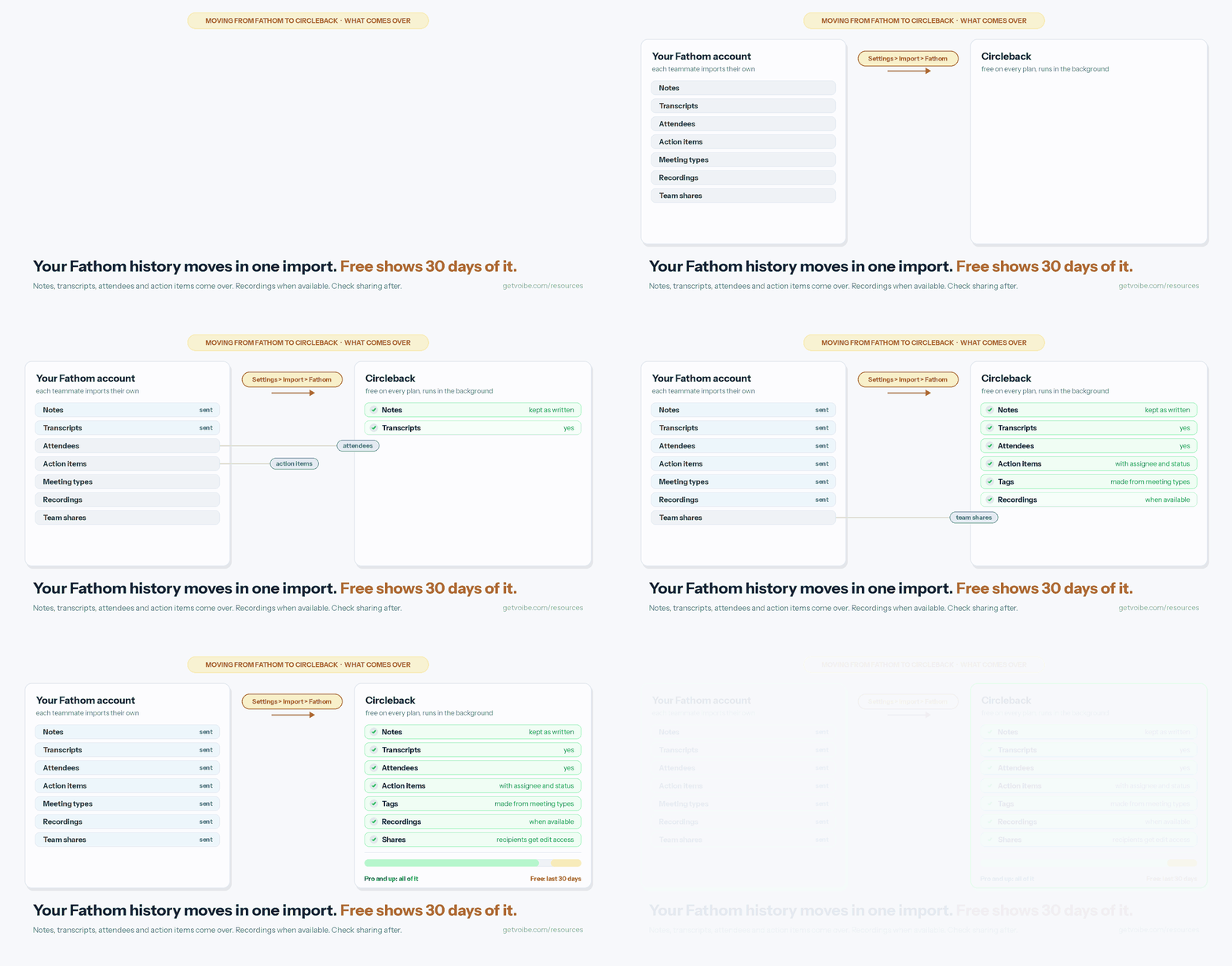
Yes, you can bring your Fathom meetings into Circleback on every plan, Free included, with its Fathom import.
How to import Fathom meetings
- In Circleback, go to Settings, then Import, and select Fathom.
- Select Connect and authorize Circleback, using the same Fathom account both times.
- Review the number of meetings and select Import. Circleback emails you when it's done.
- Ask each teammate to repeat it, because everyone imports from their own Fathom account.
| Fathom data | In Circleback |
|---|---|
| Notes | Yes, kept as written |
| Transcripts | Yes |
| Attendees | Yes |
| Action items | Yes, with assignee and status |
| Meeting types | Become tags |
| Recordings | When available |
| Sharing | Supported team or organization shares; recipients get edit access |
Before you cancel Fathom
- Pick the right plan. Circleback's switch page says Free shows 30 days of meeting history, while Pro and up show all of it.
- Expect old summaries to stay old. Imported notes keep Fathom's format and aren't rewritten.
- Download recordings you need. Fathom exports them as MP4 files, and Circleback brings them over only when available.
- Cancel the right way. Premium cancels in Fathom's settings, while Team plans go through success@fathom.video.
There's no road back, because Fathom doesn't accept uploaded calls. Coming from Otter instead? Circleback vs Otter covers that move.
Circleback or Fathom: Which Should You Choose?
Start with what your team does after a meeting. If it chases follow-ups across many tools, choose Circleback. If it sells, coaches reps or needs a BAA on a small budget, choose Fathom.
Use-case cheat sheet
| If you are… | Pick | Why |
|---|---|---|
| A product or engineering team | Circleback Pro | Action items with owners go straight to Linear |
| An account executive running MEDDPICC | Fathom Premium | Sales templates and AI action items |
| A sales manager coaching reps | Fathom Business | Deal View and coaching scorecards |
| A two-person therapy or medical practice | Fathom Team | Standard BAA at $180 per seat a year |
| A freelancer who wants a free archive | Fathom Free | Recordings kept until you delete them |
| A team on Windows that hates bots | Circleback | Bot-free desktop app on Windows 11 |
| Someone with in-person meetings on Android | Circleback | Android and Apple Watch apps |
| A company that bans AI training on its data | Circleback | Never trains on customer data |
| A lawyer, advisor or HR lead on confidential calls | Voibe Work | No bot, notes saved on your computer, dictation included |
Our Circleback alternatives and Fathom alternatives rankings cover both directions. Circleback vs Granola covers the no-bot option.
A Third Option for Confidential Calls: Voibe Work
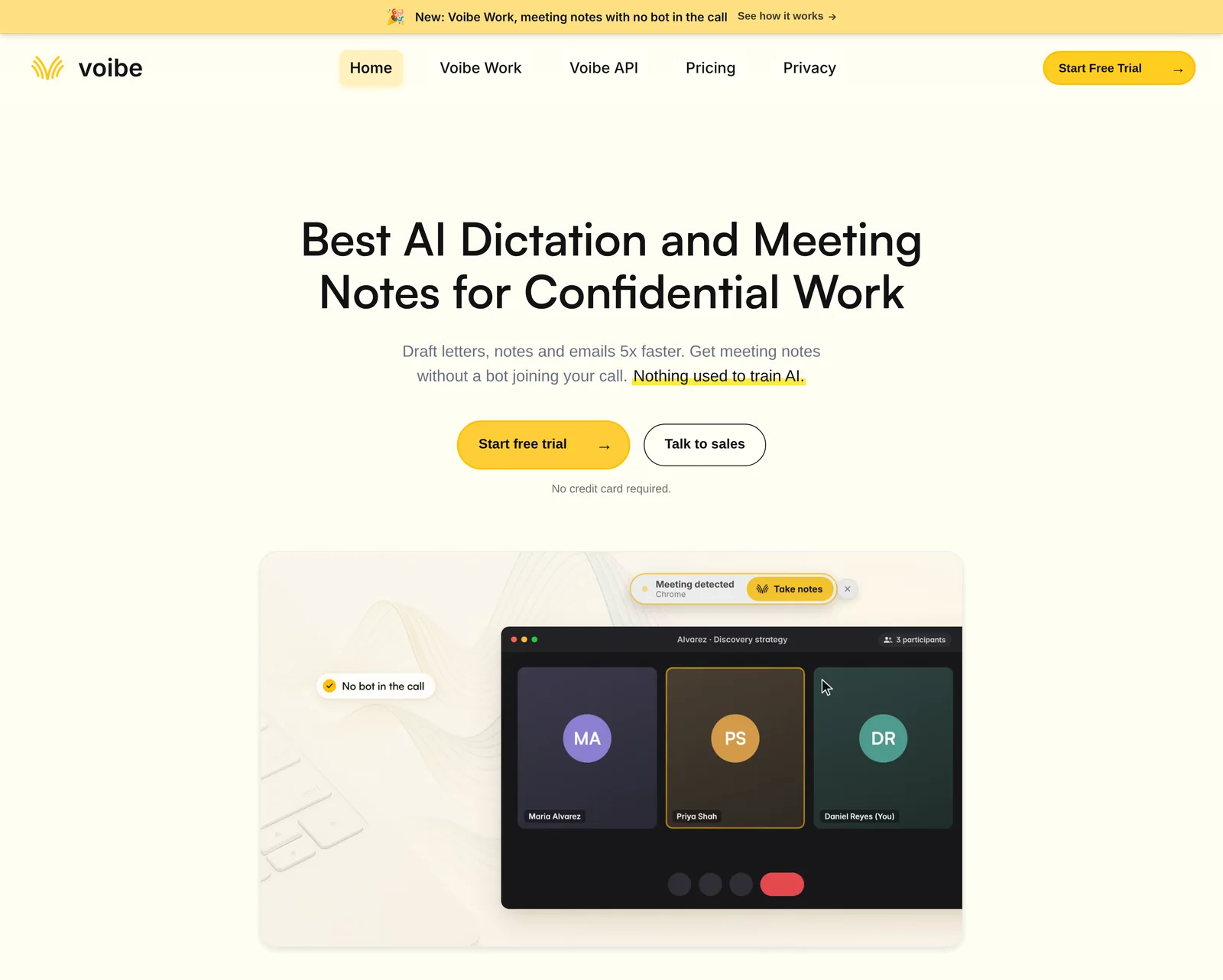
Circleback and Fathom both keep your meetings in their own US cloud. On client, patient or deal calls, you may not want that vendor-side copy.
Voibe Work is the meeting-notes plan of Voibe, the app we build.
- No bot: it captures the meeting from your Mac or Windows PC in any meeting app. In-person meetings go through your computer's mic.
- Audio deleted: open-source models on zero-retention cloud providers process the audio, then it's deleted.
- Notes on your computer: the transcript and summary are saved on your device, not Voibe's servers. They never train AI.
- Summaries you shape: templates per meeting type, including your own, plus chat with your meetings.
It costs $19 a month, $149 a year ($447 over three years) or $399 lifetime, per Voibe's pricing page. A year costs $31 (17.2%) less than Circleback Pro or Fathom Team, and $43 (22.4%) less than Fathom Premium.
Month to month, it's $1 more than Circleback Pro and $1 less than Fathom Premium.
Where Voibe Work falls short
It has no CRM sync, Deal View or calendar auto-join, so it can't cover a meeting you aren't in. There's no phone app and no recording to replay, and meeting notes need an internet connection.
Meeting notes start with a 7-day trial of every Voibe Work feature, and paid plans carry a 30-day money-back guarantee. A BAA is available on request.
Voibe reminds you to tell everyone you're taking notes when recording starts; following recording-consent rules is up to you. Our first-week guide walks through setup.
Trusted by 4,000+ professionals, including people at Netflix, NVIDIA, Amazon, Twilio, and Intercom




See Voibe Work in action
Meeting notes with no bot and no vendor-side copy
Start free on Mac or Windows. 7 days of every Voibe Work feature, no credit card required.
What Users and Reviewers Say About Circleback and Fathom
Both rate well with their own users. Fathom has far more reviews, and Circleback's ratings come mostly from its phone apps.
- Circleback: 4.81/5 on the App Store (295 ratings) and 4.9/5 on Google Play (125 reviews), both on 23 November 2026. Trustpilot showed 2.9 from 4 reviews on 13 October 2026.
- Fathom: 4.9/5 on the Chrome Web Store (1.7K ratings) and 5/5 on Capterra (868 reviews). Its iPhone app has only 15 ratings so far.
Circleback reviewers praise the notes, and one App Store reviewer rated it above Zoom's notes and Otter. A September 2026 Trustpilot reviewer said it "fails to take notes, which you only learn after the meeting".
Fathom reviewers praise the free plan and the summaries. One November 2026 Capterra reviewer called it "a little misleading to say 'free forever'" when some features are paywalled after the trial.
Final Verdict: Circleback or Fathom?
Circleback is the better choice for most teams. Every action item gets an owner in one shared list, even on Free. It also records without a bot on Windows and never trains on your meetings.
Fathom is the right choice for sales teams and small clinics. Its templates, Deal View and coaching beat anything Circleback offers for selling. Its Team plan puts a standard BAA at $180 per seat a year, so just check the training opt-out first.
If your calls are confidential, try Voibe Work, which saves the transcript and summary on your computer.
Key Takeaway
Choose Circleback for standalone notes, owned action items on every plan, bot-free capture on Windows and no AI training ($180 a year for Pro). Choose Fathom for sales templates, Deal View, a free archive that never expires and the cheapest BAA ($180 per seat a year on Team). For confidential calls, Voibe Work saves notes on your computer for $149 a year.
Circleback vs Fathom: questions people ask
Circleback vs Fathom: which has better meeting summaries?
Is Circleback better than Fathom for meeting notes?
Does Fathom's free plan include AI action items?
Is Circleback cheaper than Fathom?
Which is cheaper for a HIPAA BAA, Circleback or Fathom?
Do Circleback or Fathom train AI on my meetings?
Can I import my Fathom meetings into Circleback?
Do Circleback and Fathom use a bot?
Who owns Fathom now?
Is there an option that keeps meeting notes off the vendor's servers?
Meeting notes without a bot in your call
Voibe Work takes notes from Zoom, Teams and Meet on your Mac or Windows PC, with dictation included. Nothing used to train AI.
- ✓Mac + Windows
- ✓No bot in your calls
- ✓Nothing used to train AI
- ✓7-day free trial
Want to compare plans first? View pricing →
Related Articles
Circleback Alternatives
Nine note takers ranked against Circleback.
Fathom Alternatives
Bot-free and cheaper options ranked against Fathom.
Circleback Pricing
Free, Pro, Business and Enterprise, and what each keeps.
Fathom Pricing
Every Fathom plan and the 5-call free limit.
Is Fathom Safe?
Training defaults, storage and the Superhuman deal.
Best No-Bot Meeting Note Takers
Tools that take notes without joining the call.