

Enterprise-Only AI Privacy in 2026: The Short Answer
ChatGPT Business promises not to train on your work. On a personal ChatGPT plan, OpenAI's help center says data sharing is enabled by default.
Same company, same models, two privacy deals. The written promise belongs to the team plan. Everyone else gets a setting to find. And people already paste sensitive work into these tools. In Cisco's 2024 Data Privacy Benchmark Study, 48% of respondents admitted entering non-public company information into generative AI tools.
TL;DR: enterprise-only AI privacy means a tool's strongest privacy terms exist only on its business plans. Our AI Privacy Tracker scores 64 tools. On 12 of them, the business tier beats the free and individual plans by 15 points or more. This article covers all 12.
- Three are bad fits for individuals and small teams. Notta, Perplexity and Grok keep their real terms behind sales contracts or an API.
- Five sell the promise on a small team plan. ChatGPT, Aqua Voice, Copilot, Gemini and Wispr Flow cost $7 to $25 a seat.
- Four let you get most of the way with a switch. Cursor, Kiro, Devin Desktop and Codex have opt-outs. None is on by default for individuals.
- Voibe, which we make, has no Enterprise Gap. Every user gets the same privacy for dictation and meeting notes.
Key Takeaway
If you use any of these tools on a free or personal plan, check its training setting today. On most tools in this article, the vendor's own pages say training is on until you turn it off.
Key Takeaways: Enterprise-Only AI Privacy at a Glance
| Concept | Key point | Why it matters |
|---|---|---|
| The Enterprise Gap | Business-tier score minus consumer-tier score | A gap of 15 or more means the privacy you read about isn't the privacy you get |
| Written promise | No training by contract, on business plans only | A setting can change with a policy update; a contract can't change without notice |
| Opt-out switch | On by default for individuals on most tools | It only helps if you find it, and some only cover data collected afterwards |
| Retention | Zero retention is a business feature almost everywhere | Turning off training rarely shortens how long your data is kept |
| Private by default | Local apps and a few no-training vendors | They give individuals the business-tier deal on a free or personal plan |
What Enterprise-Only Privacy Means
Enterprise-only privacy is when a vendor's best privacy terms apply only to business customers. That means the no-training promise, short retention and admin controls. Individuals on the same product get a weaker deal. Usually it's a training opt-out that starts switched on.
We call the difference the Enterprise Gap. It's a tool's business-tier score minus its consumer-tier score in our tracker. Each tier is scored out of 100 on four axes: Training, Retention, On-device and Track record. A gap of 15 points or more earns a “Private on business plans only” flag on the tracker's scoreboard.
Three things usually sit on the business side of the gap:
- A written no-training clause in the contract or data processing agreement, rather than a toggle in settings.
- Zero or short retention, often through zero-retention agreements with the vendor's AI providers.
- Admin locks and paperwork, such as a BAA for health data or a DPA for European customers.
On the free and individual side, the opt-out is the whole deal. Training is on by default for most tools here. The switch rarely shortens retention. On Perplexity, it only covers data collected after you flip it. Our zero data retention explainer covers why retention matters as much as training.
The 12 AI Tools With the Biggest Enterprise Gap
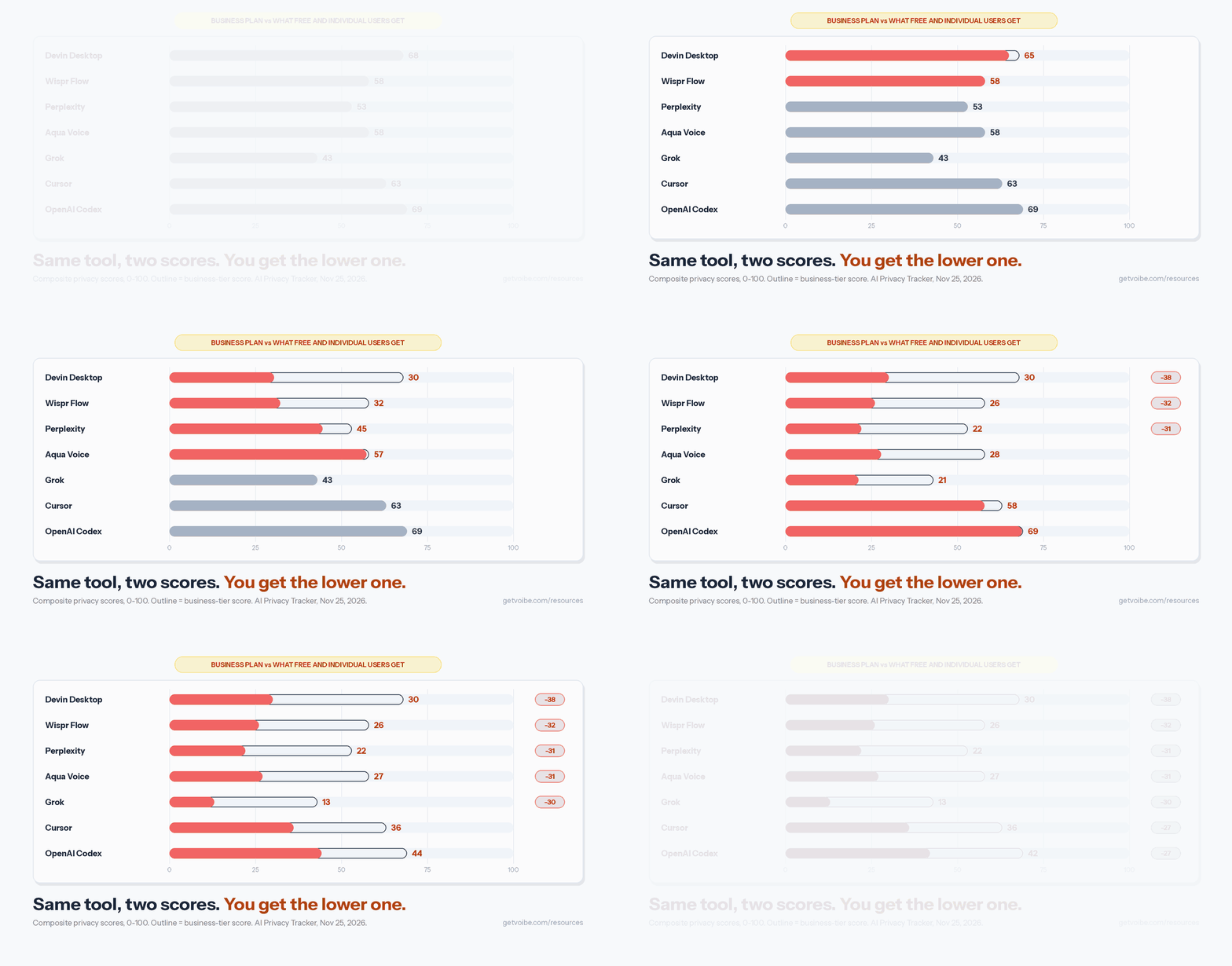
These tools' business tiers beat their consumer tiers by 15 points or more. The biggest gap comes first. Prices come from each vendor's pricing page on November 25, 2026.
| Tool | Free or individual | Business | Gap | Cheapest private path | Can 1 to 5 people buy it? |
|---|---|---|---|---|---|
| Devin Desktop | 30 | 68 | 38 | Pro $20/mo with training disabled | Yes |
| Wispr Flow | 26 | 58 | 32 | Growth $18/user/mo annual | Yes, appears self-serve |
| Perplexity | 22 | 53 | 31 | Enterprise Pro $40/seat/mo | Unclear, no self-serve trial |
| Aqua Voice | 27 | 58 | 31 | Business $19/seat/mo annual, 2-seat minimum | Yes, from 2 seats |
| Grok | 13 | 43 | 30 | xAI API, pay per token (developers only) | Only as an API |
| Cursor | 36 | 63 | 27 | Privacy Mode, free on any plan | Yes |
| OpenAI Codex | 42 | 69 | 27 | Free opt-out, or the API | Yes |
| Gemini | 31 | 57 | 26 | Workspace Business Starter $7/user/mo annual | Yes, needs a domain |
| Kiro | 31 | 55 | 24 | Paid tier assigned through the AWS console | Yes, with an AWS account |
| GitHub Copilot | 26 | 45 | 19 | Copilot Business $19/seat/mo | Yes, through a free organization |
| ChatGPT | 44 | 60 | 16 | ChatGPT Business $20/seat/mo annual, 2+ users | Yes, from 2 users |
| Notta | 38 | 54 | 16 | Enterprise, custom price, from 51 seats | No |
Gemini CLI used to sit on this list. Since June 18, 2026, Google has served individuals only through a paid Gemini API key, which it doesn't train on. Free users were moved to Antigravity CLI, so Gemini CLI no longer has a gap.
Bad Fits for Individuals and Small Teams: Notta, Perplexity, Grok
These three keep their best terms out of reach for an individual or a five-person business. A setting won't close the gap. The private plan is a sales call or a developer product.
Notta: No-Training Starts at 51 Seats (38 vs 54)
Notta is the clearest case of enterprise-only privacy in this list. Its help center lists “No data training” as an Enterprise feature. Enterprise starts at 51 seats, at a custom price.
Notta's privacy policy has no general training rule and no opt-out. Its no-training clauses cover only Google Workspace data and its MCP integration. A Japanese help article adds one more detail. The third-party speech engine Notta uses trains on sampled Japanese audio, except on Enterprise and a Japan-only plan.
For a solo consultant or a small agency, there's no way to buy the promise. Notta's Business plan costs $16.67 a month billed annually. It still scores on the consumer side.
Perplexity: The Contract Costs $40 a Seat (22 vs 53)
Perplexity's help center says AI data retention is on by default on Free, Pro and Max. You can turn it off for free in Settings, under Preferences. For long-time users, timing matters: opt-outs apply only to data collected afterwards, and earlier training data can't be removed.
The written promise lives on Enterprise. Perplexity says it never trains its models on enterprise customers' data. Enterprise Pro costs $40 a seat a month or $400 a year. There's no self-serve Enterprise trial, and Perplexity doesn't say whether one person can buy a seat.
The API doesn't train on customer content either. But zero data retention isn't the default there. It needs a written agreement.
Grok: Private Only Through the Developer API (13 vs 43)
Grok has the lowest consumer score in our tracker. The chat app on X and grok.com trains on posts and chats by default. Our last full read found three separate opt-outs, one each for X, the mobile app and the web.
The private version is xAI's developer API. xAI says it never trains on API inputs or outputs without explicit permission. It keeps them 30 days for abuse checks. Anyone can buy API credits, but the API is for programmers, not a chat app.
On November 23, 2026, Virginia and Oregon sued SpaceX, which now runs xAI, over images Grok generated. X's help pages blocked our checks this month, and the consumer opt-out details date from May 2026.
A Small Team Plan Buys the Promise: ChatGPT, Aqua Voice, Copilot, Gemini, Wispr Flow
These five sell their written terms on plans a small business can buy without calling sales. You pay per seat, and two of them need at least two seats.
ChatGPT: $40 a Month Minimum for the Business Promise (44 vs 60)
ChatGPT Business costs $20 a seat a month billed annually, or $25 monthly. With a two-user minimum, the floor is $40 a month. OpenAI lists “No training on your business data by default” as part of the plan.
On personal Free, Go, Plus and Pro plans, data sharing is on by default. You turn it off with “Improve the model for everyone” under Data controls. The switch is free. It also covers Codex on a personal account.
ChatGPT has the smallest gap in this list. Its consumer tier deletes chats within 30 days and offers Temporary Chat. A solo user who flips the switch gets decent protection without the contract.
Aqua Voice: Zero Retention Needs Two Business Seats (27 vs 58)
Aqua Voice Business includes zero data retention. Seats cost $19 a month billed annually or $24 monthly. There's a two-seat minimum, so a one-person business pays for a seat nobody uses.
Aqua's privacy policy changed on November 13, 2026. With Privacy Mode off, Aqua now stores dictation audio and transcripts on its servers to improve the service. Turning on Privacy Mode stops that storage. Aqua doesn't say which plans include the switch or whether it starts on.
GitHub Copilot: Individuals Train by Default Since April (26 vs 45)
Since April 24, 2026, GitHub trains on interaction data from Copilot Free, Pro and Pro+ users. They can opt out for free under Privacy in Copilot settings. GitHub says Business and Enterprise users aren't affected.
Copilot Business costs $19 a seat a month and needs a GitHub organization. A free organization costs nothing, so a solo developer can buy it. Business still keeps chat on github.com for the life of the account, which holds its own score to 45.
Gemini: Workspace Starter Is the Cheapest Fix in This List (31 vs 57)
On a personal Google account, Gemini's training setting for chat content is on by default for adults. Turning History off still leaves chats saved for around two months. Before November 2026 it was 72 hours.
Google Workspace says it doesn't use customer data to train models without permission. Business Starter costs $7 a user a month billed annually, or $8.40 on a flexible plan. There's no published seat minimum. You need your own domain, which most small businesses already have.
Wispr Flow: Growth Locks Training Off, Free and Pro Don't (26 vs 58)
Wispr Flow's help center says its training setting is on by default for Free and Pro. Every plan can opt out for free.
Wispr's privacy page says training is off and locked on Growth and Enterprise. Growth costs $18 a user a month billed annually, or $23 monthly. Wispr publishes no seat minimum.
The pricing page describes Growth's control as admin control over training. That's softer than the privacy page, so confirm which applies before you sign up.
A Switch or a $20 Plan Gets You Most of the Way: Cursor, Kiro, Devin, Codex
These four coding tools let an individual turn training off without a business contract. The gap remains for other reasons. The default is on, retention is longer, or the switch costs money.
Cursor: Privacy Mode Is Free but Not On by Default (36 vs 63)
Cursor's security page says Privacy Mode is available to anyone, free or Pro. With it on, Cursor guarantees your code isn't used for training. That covers Cursor and its model providers.
Cursor turns Privacy Mode on by default for teams. For individuals, its pages say you can enable it during onboarding or in settings. They don't say it starts on. With it off, Cursor may use and store code, prompts and editor actions for training.
Kiro: A Free Opt-Out, but Free Inputs Stay 60 Days (31 vs 55)
Kiro collects content for service improvement by default on Free and individual plans. The opt-out is free, under Telemetry and Content. It doesn't stop AWS keeping Free inputs for up to 60 days for abuse detection.
Kiro's enterprise users are opted out automatically. AWS defines them as anyone given a Kiro tier through the AWS console, which means a $20 paid seat assigned that way qualifies. Kiro doesn't say whether its $20 Teams plan counts.
Devin Desktop: The Opt-Out Costs $20 a Month (30 vs 68)
Devin Desktop, formerly Windsurf, has the biggest gap in our tracker. Cognition's docs say it may use your data for model training by default. Only paid plans can opt out.
On Pro at $20 a month, turning on Disable training also turns on zero data retention with Cognition's providers. It gives one person the business-tier deal at an individual price. Free users can't get it at all.
OpenAI Codex: The ChatGPT Switch Covers It (42 vs 69)
Codex on a personal ChatGPT account follows your ChatGPT training preference, says OpenAI's help center. One switch covers both.
Codex through an API key, ChatGPT Business, Enterprise or Edu isn't used for training by default. The API keeps inputs up to 30 days for abuse monitoring. It's billed per token, so a solo developer can buy it.
What This Means For You
What enterprise-only privacy means for you depends on how many people will use the tool and what you'll put into it.
- Individuals: treat the consumer score as your score. Before you use any tool here for work, find its training switch and turn it off. If a tool has no free switch, like Notta or Devin's Free plan, choose another tool.
- Small businesses of two to fifty people: a team plan often gets you the written promise for less than you'd expect. Workspace Starter at $7 a user and ChatGPT Business at $40 a month are the cheapest here. Budget for seat minimums.
- Regulated work: health, legal and financial data need the contract, not the switch. If the business tier is sales-only or needs 51 seats, it doesn't fit a small practice.
A switch also protects only the account that flips it. In a small team without admin controls, one colleague who never opens settings can feed client data into training.
Private by Default Without an Enterprise Contract
Some tools give individuals the business-tier deal on a free or personal plan. They run on your own computer, or they promise no training on every plan.
| Job | Tool | Consumer score | Why it's private by default |
|---|---|---|---|
| Dictation | Handy, VoiceInk | 97 | Open-source apps that transcribe on your computer |
| Dictation | Voibe (on-device mode) | 97 | Transcribes on Apple Silicon Macs with nothing leaving the machine |
| Chat with an AI model | Jan, Ollama | 94, 93 | Run open models locally with no vendor server |
| Writing tools on a Mac or iPhone | Apple Intelligence | 85 | On-device first, then Apple's Private Cloud Compute |
| Coding agent | Cline (your own API key) | 78 | Requests go straight to the provider you choose |
| Meeting notes | Voibe Work | 72 | Audio deleted after processing; notes saved on your device |
| Meeting notes | Jamie | 58 | Lists no model training on every plan, Free included |
We make Voibe and Voibe Work, and we score them with the same method as every other tool. Voibe's on-device mode needs an Apple Silicon Mac. On Windows and Intel Macs it uses a zero-retention cloud, which scores 71. Voibe Work's meeting notes need an internet connection.
Voibe: The Same Privacy on Every Plan
Voibe, the dictation and meeting-notes app we make, gives every user the same privacy out of the box. There's no enterprise tier holding back better terms, and no training switch to find.
- On-device dictation: on Apple Silicon Macs, Voibe can transcribe on your Mac with no internet. Nothing leaves the machine.
- Zero-retention cloud: on Windows, Intel Macs, or if you choose it, audio is encrypted in transit and transcribed by open-source models. It's deleted the moment transcription completes, and it's never stored, sold or used to train any model.
- Meeting notes with no bot: Voibe Work records from your Mac or Windows PC. Meeting audio is deleted once processing finishes, and transcripts and summaries are saved on your computer, not on Voibe's servers.
The same rules apply whether you're trying Voibe, working solo or running a 10-person team. A BAA is available on request. When recording starts, Voibe reminds you to tell everyone you're taking notes, and the consent rules where you are still apply.
If your dictation or meeting notes include anything you'd keep out of a training set, try Voibe free on your Mac or Windows PC. You don't need an account to start.
Enterprise-Only AI Privacy: FAQ
Quick answers, grouped by who's asking.
Basics
What is enterprise-only AI privacy?
Enterprise-only AI privacy is when an AI tool's no-training promise, short retention and admin controls apply only to business or enterprise customers. Individuals on the same tool usually get a training opt-out that is on by default.
What is the Enterprise Gap?
The Enterprise Gap is a tool's business-tier privacy score minus its consumer-tier score in Voibe's AI Privacy Tracker. A gap of 15 points or more earns a “Private on business plans only” flag. Devin Desktop has the largest gap, 38 points.
Individuals
Is there a dictation app that keeps privacy for free users too?
Yes. Voibe gives every user the same privacy on every plan: on-device transcription on Apple Silicon Macs, and a zero-retention cloud elsewhere that deletes audio the moment transcription completes and never uses it for training. Local apps such as Handy and VoiceInk also keep everything on your computer.
Is turning off training enough on a free plan?
It helps, but it rarely matches the business deal. Most opt-outs don't shorten retention, Kiro keeps Free inputs up to 60 days for abuse checks, and Perplexity's opt-out applies only to data collected afterwards.
Which AI tools let individuals turn off training for free?
ChatGPT, Codex, Gemini, Perplexity, GitHub Copilot, Kiro, Cursor and Wispr Flow all have free opt-outs, as of November 25, 2026. Devin Desktop's opt-out needs a paid plan, and Notta publishes none.
Small businesses
What is the cheapest way for a small business to get a no-training promise?
Of the tools here, Google Workspace Business Starter is cheapest at $7 a user a month billed annually, with no published seat minimum. ChatGPT Business starts at $40 a month for two users.
Is Notta a good fit for a small business that needs privacy?
Not if it needs a no-training promise. Notta lists no data training as an Enterprise feature, and Enterprise starts at 51 seats with custom pricing.
Which Plan to Pick if You're Not an Enterprise
If you're on your own, the privacy you get is the consumer score. Pick tools with a free switch or a private-by-default design. If you're a small team, compare the per-seat price of the private plan before you compare features.
Every score in this article comes from the AI Privacy Tracker, which we re-check monthly. The November 2026 AI privacy changes cover what moved this month. For tools your IT team will approve, see our IT-approved AI tools guide, and our dictation privacy hub collects every is-it-safe investigation.